
Rhombus Diagonals by m.west (2)
Loading the math board and drawing, please wait…
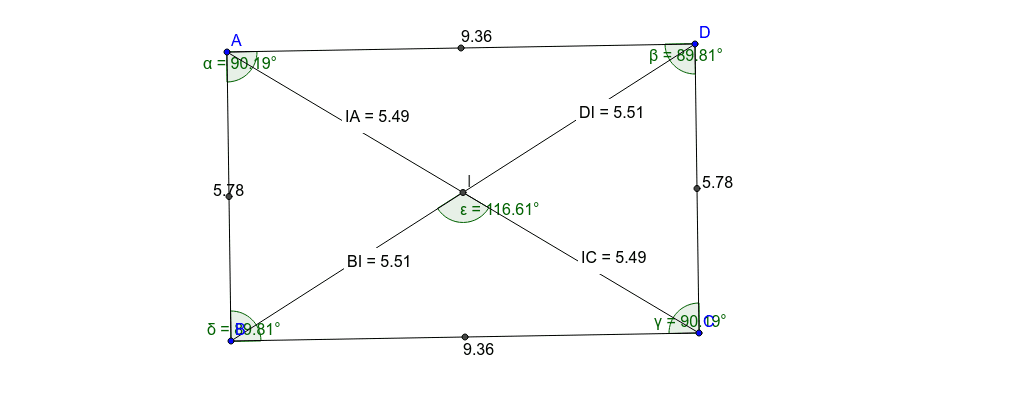
This example demonstrates the properties and relationships of diagonals in a rhombus, involving core concepts like perpendicular bisectors, angle bisectors, sine theorem, geometric mean, and translations. It is constructed using commands such as Segment, Angle, Midpoint, Intersect, and Distance, with multiple auxiliary points and text objects. Suitable for middle school and above mathematics education to visually understand rhombus geometry and calculations.
GeoGebra Commands & Parameters
Segment(A, D) → aSegment(D, C) → bSegment(C, B) → cSegment(A, B) → dAngle(B, A, D) → αAngle(A, D, C) → βAngle(D, C, B) → γAngle(C, B, A) → δMidpoint(A, D) → EMidpoint(D, C) → FMidpoint(C, B) → GMidpoint(B, A) → HSegment(D, B) → eSegment(A, C) → fIntersect(e, f) → IDistance(D, I) → distanceDIMidpoint(D, I) →Distance(I, A) → distanceIAMidpoint(I, A) →Distance(B, I) → distanceBIMidpoint(B, I) →Distance(I, C) → distanceICMidpoint(I, C) →Angle(e, f) → ε
AI Drawing Prompt Reference
Draw a rhombus with its diagonals intersecting at right angles and bisecting each other. Mark the intersection point of the diagonals and calculate the lengths of all sides and diagonals. Use auxiliary points to indicate the midpoints of the sides and diagonals, and display the relevant angles and distances. The final image should clearly show the symmetry of the rhombus and the relationships between its diagonals, suitable for geometry education.
The prompt above was compiled from the original drawing commands and is for reference only.