
Shadow and Projection
Loading the math board and drawing, please wait…
In collections
Projections and Angles
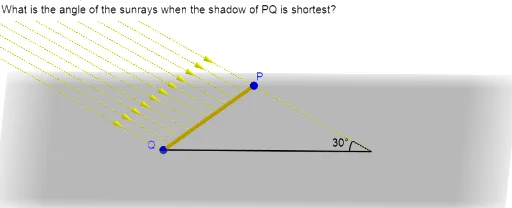
This example demonstrates the concepts of shadow and projection. It involves similar triangles and angles in geometry. Using GeoGebra commands such as Segment, Ray, UnitVector, Sequence, and Angle, a dynamic model of shadow and projection can be constructed. Suitable for middle school and above students to learn geometry and trigonometry.
GeoGebra Commands & Parameters
Segment(Q, P) → fRay(R, P) → gUnitVector(g) → uSequence(Ray[Q + (i * (P - Q) / 10), Q + (i * (P - Q) / 10) + u], i, 0, 9) → list1Segment(Q, R) → hAngle(P, R, Q) → βSegment(P, R) → iSequence(Vector[Q + (i * (P - Q) / 10) + (3 * u), Q + (i * (P - Q) / 10) + (2 * u)], i, 0, 10) → list2
AI Drawing Prompt Reference
Draw a triangle PQR with PQ as the base and PR as the hypotenuse. Draw a ray from point P to point R. Then, starting from point P, draw parallel lines to PR at regular intervals until reaching point Q. Next, draw the angle PQR and, starting from point Q, draw lines at regular intervals that are in a 3:2 ratio with PR.
The prompt above was compiled from the original drawing commands and is for reference only.