
Set Area of Rectangle: Dynamic Exploration with Random Points
Loading the math board and drawing, please wait…
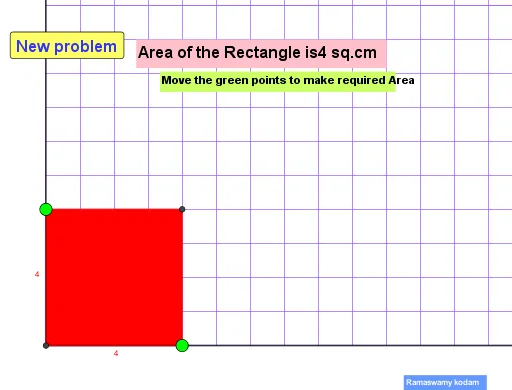
① This GeoGebra example demonstrates how to set and calculate the area of a rectangle dynamically, using random points and geometric constructions to visualize the relationship between area and side lengths. ② Core mathematical concepts include the rectangle area formula, arithmetic mean, subtraction, percentages, correlation, and polynomial functions applied to area variations. ③ Construction highlights: commands such as Intersect, Point, Ray, OrthogonalLine, Polygon, Sequence, and RandomElement are used to build the rectangle and auxiliary elements; sliders control variables, while text and buttons display numerical results and statistical summaries. ④ Suitable for middle and high school students, this example supports teaching of geometry, algebra, and data analysis, and serves as an interactive tool for exploring area formulas and variable relationships.
GeoGebra Commands & Parameters
Intersect(xAxis, yAxis) → APoint(xAxis) → BPoint(yAxis) → CRay(A, B) → fRay(A, C) → gOrthogonalLine(E, f) → hOrthogonalLine(D, g) → iIntersect(i, h) → FPolygon(A, E, F, D) → q1, a_1, e, f_1, d_1Sequence((2 * n), n, 1, 20) → l1RandomElement(l1) → b
AI Drawing Prompt Reference
Draw a coordinate plane with the origin as one vertex of a rectangle. Place a point on the x-axis and another on the y-axis as adjacent vertices. From the origin, draw rays along the positive x-axis and positive y-axis. Through the x-axis point, draw a line perpendicular to the x-axis ray; through the y-axis point, draw a line perpendicular to the y-axis ray. These two perpendicular lines intersect at a fourth point, forming a rectangle with the origin and the two axis points. Show the area of the rectangle. Additionally, generate a sequence of even numbers from 2 to 40, and randomly select one number from this sequence to dynamically adjust a side length of the rectangle, illustrating how the area changes with the side length.
The prompt above was compiled from the original drawing commands and is for reference only.