
Fraction Addition Visualized: Geometric and Number Line Demonstration
Loading the math board and drawing, please wait…
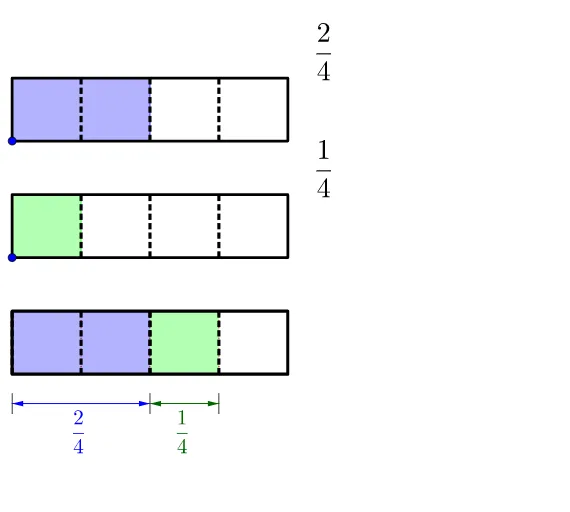
① This GeoGebra example dynamically demonstrates fraction addition by representing fractions as geometric shapes and number line segments, making abstract arithmetic operations intuitive. ② Core mathematical concepts include fraction addition, arithmetic mean, linear functions, and the correspondence between fractions and geometric areas, with extensions to Pythagorean theorem and scatter plots. ③ Construction highlights: using commands such as Point, Ray, Polygon, Sequence, Textfield, Segment, Vector, and FractionText to build fraction rectangles and number line scales; dynamic sliders or objects adjust numerators and denominators; Position and textheight manage text layout for clear step-by-step visualization. ④ Suitable for upper elementary to middle school students learning fraction operations, and useful for teachers in classroom demonstrations or for students' independent exploration of the geometric meaning of fraction addition.
GeoGebra Commands & Parameters
Point(yAxis) → CPoint(Segment[C + (0, h), C + (0, (1.85 * h))]) → BIf(t ≤ 0.5, 0, (2 * (t - 0.5))) → t2If(t ≤ 0.5, (2 * t), 1) → t1Point(Segment[B + (0, h), B + (0, (1.85 * h))]) → ARay((0, 1.9), (0, 2.9)) → fPolygon({A, A + (l, 0), A + (l, h), A + (0, h)}) → poly1Polygon({B, B + (l, 0), B + (l, h), B + (0, h)}) → poly2Sequence(Segment[A + ((i * (l) / a1), 0), A + ((i * (l) / a1), h)], i, 1, a1 - 1) → list1Sequence(Segment[B + ((i * (l) / a2), 0), B + ((i * (l) / a2), h)], i, 1, a2 - 1) → list2Polygon({A, A + ((b1 * (l) / a1), 0), A + ((b1 * (l) / a1), h), A + (0, h)}) → poly3Polygon({B, B + ((b2 * (l) / a2), 0), B + ((b2 * (l) / a2), h), B + (0, h)}) → poly4Sequence(Sequence[Segment[A + ((i * (l) / a1) + (j * (l) / ((a1 * c1))), 0), A + ((i * (l) / a1) + (j * (l) / ((a1 * c1))), h)], j, 1, c1 - 1], i, 0, a1 - 1) → list3Sequence(Sequence[Segment[B + ((i * (l) / a2) + (j * (l) / ((a2 * c2))), 0), B + ((i * (l) / a2) + (j * (l) / ((a2 * c2))), h)], j, 1, c2 - 1], i, 0, a2 - 1) → list4If(a1 ≟ a2, true, false) → equaldIf(equald ∧ (Div[b1 + b2, a1] > 0 ∨ GCD[b1 + b2, a1] > 1), true, If[Div[(b1 * c1) + (b2 * c2), (a1 * c1)] > 0 ∨ GCD[(b1 * c1) + (b2 * c2), (a1 * c1)] > 1, true, false]) → simplifyTextfield(a1) → InputBox1Textfield(b1) → InputBox2Textfield(a2) → InputBox3Textfield(b2) → InputBox4Polygon({A', A' + (l, 0), A' + (l, h), A' + (0, h)}) → poly5Polygon({B', B' + ((b2 / a2 * l), 0), B' + ((b2 / a2 * l), h), B' + (0, h)}) → poly6Polygon({A', A' + ((b1 * (l) / a1), 0), A' + ((b1 * (l) / a1), h), A' + (0, h)}) → poly7Polygon({B', B' + ((b2 * (l) / a2), 0), B' + ((b2 * (l) / a2), h), B' + (0, h)}) → poly8Sequence(Sequence[Segment[A' + ((i * (l) / a1) + (j * (l) / ((a1 * c1))), 0), A' + ((i * (l) / a1) + (j * (l) / ((a1 * c1))), h)], j, 1, c1 - 1], i, 0, b1 - 1) → list8Sequence(Sequence[Segment[B' + ((i * (l) / a2) + (j * (l) / ((a2 * c2))), 0), B' + ((i * (l) / a2) + (j * (l) / ((a2 * c2))), h)], j, 1, c2 - 1], i, 0, b2 - 1) → list9Segment(C - (0, 0.5), C - (0, 1)) → gSegment(C + ((b1 / a1 * l), -0.5), C + ((b1 / a1 * l), -1)) → iSegment(C + ((b1 / a1 * l) + (b2 / a2 * l), -0.5), C + ((b1 / a1 * l) + (b2 / a2 * l), -1)) → jVector(Midpoint[g], Midpoint[i]) → uVector(Midpoint[i], Midpoint[g]) → vVector(Midpoint[i], Midpoint[j]) → wVector(Midpoint[j], Midpoint[i]) → aSequence(Segment[A' + ((i * (l) / a1), 0), A' + ((i * (l) / a1), h)], i, 0, b1) → list6Sequence(Segment[B' + ((i * (l) / a2), 0), B' + ((i * (l) / a2), h)], i, 0, b2) → list7Sequence(Polygon[{C + ((i * l), 0), C + ((i * l) + l, 0), C + ((i * l) + l, h), C + ((i * l), h)}], i, 1, floor(b1 / a1 + b2 / a2)) → list5Segment(B', B' + ((b2 / a2 * l), 0)) → kSegment(B' + ((b2 / a2 * l), h), B' + (0, h)) → mIf(b1 / a1 + b2 / a2 ≥ 1, true, false) → improperFractionText(b1 / a1 + b2 / a2) → text19FractionText(b1 / a1 + b2 / a2 - 1) → text20Sequence(Sequence[Segment[C + ((i * (l) / ((a1 * c1))) + (j * l), 0), C + ((i * (l) / ((a1 * c1))) + (j * l), h)], i, 1, (a1 * c1) - 1], j, 0, If[b1 / a1 + b2 / a2 ≤ 1, 0, 1]) → list10
AI Drawing Prompt Reference
Draw a geometric representation of adding two fractions, including rectangular representations of the fractions on a number line. First, draw rectangles for each fraction on the number line, then add them to form a new rectangle. Use sliders to adjust the numerators and denominators of the fractions, dynamically showing their geometric meaning and the addition process.
The prompt above was compiled from the original drawing commands and is for reference only.