
Algebra Expression Placeholder Exploration: Random Polygons and Prime Factors
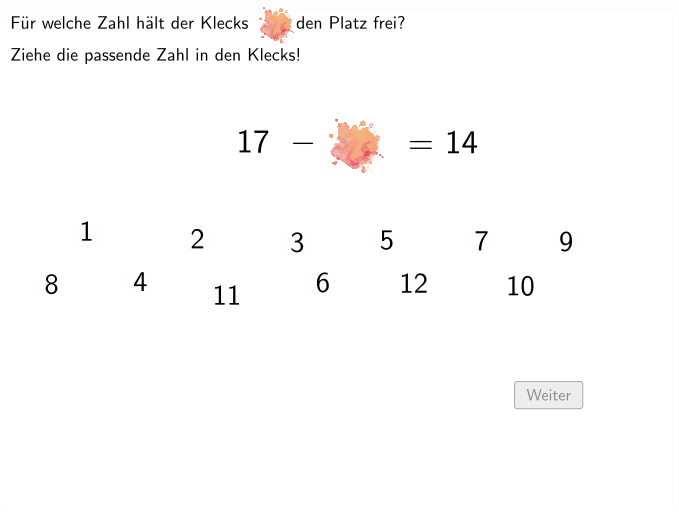
Loading the math board and drawing, please wait…
In collections
Wiederholung: Variablen, Terme und Gleichungen
① This GeoGebra example dynamically demonstrates the concept of placeholders (variables) in algebraic expressions, using randomly generated polygons and points to help students intuitively understand the role of variables in expressions. ② Core mathematical concepts include constructing and interpreting algebraic expressions, variables and constants, random numbers, prime factorization, and conditional logic (e.g., IsInRegion to check if a point lies inside a region). ③ Construction highlights: uses Random command for random generation, Polygon and PointIn to create polygons and interior points, Centroid for center of mass, Shuffle and PrimeFactors for prime factorization, CountIf to count objects meeting conditions, and If for conditional display; key objects include polygon rec1, points C1-C4, and prime factor lists. ④ Suitable for grades 5-6, this resource helps students practice building and interpreting algebraic expressions in varied contexts, fostering symbolic awareness and logical reasoning, and can serve as interactive classroom material for teachers.
GeoGebra Commands & Parameters
Random(5, 30) → aPolygon(C2, C3, C4, C1) → rec1, c2, c3, t_2, c1Polygon(L, O, P, S) → v1, l_5, o_1, p_4, s_2PointIn(v1) → S_1Polygon(S_1, B_{16}, C_1, D_1) → q1, a_1, b_1, c_1, d_1Centroid(q1) → M_1PointIn(v1) → S_{11}Tool1(S_{11}) → M_{11}, q11, j_4, k_4, l_4, m_4PointIn(v1) → S_9Tool1(S_9) → M_9, q9, f_4, g_4, h_4, i_4PointIn(v1) → S_7Tool1(S_7) → M_7, q7, b_{4}, c_3, d_3, e_3PointIn(v1) → S_5Tool1(S_5) → M_5, q5, r_3, s_3, t_3, a_3PointIn(v1) → S_3Tool1(S_3) → M_3, q3, m_3, n_3, p_3, q_3PointIn(v1) → S_2Tool1(S_2) → M_2, q2, i_3, j_3, k_3, l_3PointIn(v1) → S_{12}Tool1(S_{12}) → M_{12}, q12, l_2, m_2, n_2, p_2PointIn(v1) → S_{10}Tool1(S_{10}) → M_{10}, q10, h_2, i_2, j_2, k_2PointIn(v1) → S_8Tool1(S_8) → M_8, q8, t_1, e_1, f_2, g_2PointIn(v1) → S_6Tool1(S_6) → M_6, q6, p_1, q_1, r_1, s_1PointIn(v1) → S_4Tool1(S_4) → M_4, q4, k_1, l_1, m_1, n_1Point(yAxis) → AIsInRegion(M_3, rec1) → on3If(switch ≟ 3, Random[1, 5], Random[1, 12]) → varIsInRegion(M_{12}, rec1) → on12IsInRegion(M_{11}, rec1) → on11IsInRegion(M_{10}, rec1) → on10IsInRegion(M_9, rec1) → on9IsInRegion(M_8, rec1) → on8IsInRegion(M_7, rec1) → on7IsInRegion(M_6, rec1) → on6IsInRegion(M_5, rec1) → on5IsInRegion(M_4, rec1) → on4IsInRegion(M_2, rec1) → on2IsInRegion(M_1, rec1) → on1Shuffle({"x", "g", "h", "k", "m"}) → Variablen, {"m", "k", "h", "x", "g"}Polygon((x(C2) - s, y(C1) + s / 10), (x(C2) - s, y(C2) - s / 10), (x(C3) + s, y(C2) - s / 10), (x(C3) + s, y(C1) + s / 10)) → q13, f, g, h, iIf(a > var, (a * var), (var * a)) → b2If(a > var, a + var, var + a) → b1If(a > var, a - var, var - a) → b3PrimeFactors(a) → pfaPrimeFactors(var) → pfvarIf(a > var ∧ dv1, var / a, If[dv2, a / var]) → b4If(switch ≟ 4 ∧ dv1 ≟ false ∧ dv2 ≟ false, Random[1, 3]) → bIf(switch ≟ 4 ∧ dv1 ≟ false ∧ dv2 ≟ false, Random[1, 3]) → cIf(switch ≟ 4 ∧ dv1 ≟ false ∧ dv2 ≟ false, Random[1, 3]) → dIf(switch ≟ 4 ∧ dv1 ≟ false ∧ dv2 ≟ false, Random[1, 3]) → eIf(switch ≟ 4 ∧ dv1 ≟ false ∧ dv2 ≟ false, Random[1, 3]) → jIf(switch ≟ 4 ∧ dv1 ≟ false ∧ dv2 ≟ false, Random[1, 3]) → kIf(switch ≟ 4 ∧ dv1 ≟ false ∧ dv2 ≟ false, Random[1, 3]) → lIf(switch ≟ 4 ∧ dv1 ≟ false ∧ dv2 ≟ false, Random[1, 3]) → mIf(switch ≟ 4 ∧ dv1 ≟ false ∧ dv2 ≟ false, Random[1, 3]) → nIf(switch ≟ 4 ∧ dv1 ≟ false ∧ dv2 ≟ false, Random[1, 3]) → oIf(switch ≟ 4 ∧ dv1 ≟ false ∧ dv2 ≟ false, Random[1, 3]) → pIf(switch ≟ 4 ∧ dv1 ≟ false ∧ dv2 ≟ false, Random[1, 3]) → qIf(switch ≟ 4 ∧ dv1 ≟ false ∧ dv2 ≟ false, Random[1, 3]) → rIf(switch ≟ 4 ∧ dv1 ≟ false ∧ dv2 ≟ false, Random[1, 3]) → tIf(switch ≟ 4 ∧ dv1 ≟ false ∧ dv2 ≟ false, Random[1, 3]) → uIf(switch ≟ 4 ∧ dv1 ≟ false ∧ dv2 ≟ false, Random[1, 3]) → vIf(switch ≟ 4 ∧ dv1 ≟ false ∧ dv2 ≟ false, Random[1, 3]) → wIf(switch ≟ 4 ∧ dv1 ≟ false ∧ dv2 ≟ false, Random[1, 3]) → f_1PointIn(q13) → ValCountIf(x ≠ "", Variablen) → Anzahl
AI Drawing Prompt Reference
Create a dynamic illustration showing the concept of placeholders (variables) in algebraic expressions using randomly generated polygons and points to help students intuitively understand the role of variables. The core mathematical concepts include constructing and interpreting algebraic expressions, variables and constants, random numbers, prime factorization, and conditional logic. The illustration features polygons and points generated randomly, with prime factorization and conditional logic to check if points lie inside polygons, ultimately displaying prime factor lists and the results of expression calculations.
The prompt above was compiled from the original drawing commands and is for reference only.