
Segment, Midpoint, Intersection (Centroid)
Loading the math board and drawing, please wait…
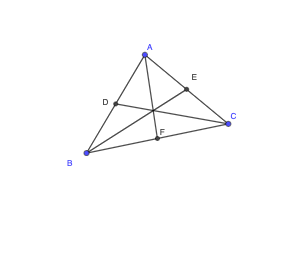
This example demonstrates the geometric process of drawing segments, calculating midpoints, finding intersections, and displaying the centroid using GeoGebra. Core math concepts include segments, midpoints, intersections, centroids, and coordinate geometry. Construction highlights involve using Segment, Midpoint, and Intersection commands. Suitable for high school mathematics teaching and geometric construction learning.
GeoGebra Commands & Parameters
Segment(A, B) → fSegment(B, C) → gSegment(C, A) → hMidpoint(A, B) → DMidpoint(A, C) → EMidpoint(B, C) → FSegment(B, E) → iSegment(D, C) → jSegment(A, F) → k
AI Drawing Prompt Reference
On a coordinate plane, start with three points A, B, and C, and draw the three side segments to form the triangle ABC. Next, find the midpoints of AB, AC, and BC, labeled D, E, and F. Then draw additional segments that connect B to E, D to C, and A to F. The result should be a midpoint-based line construction inside and around the triangle.
The prompt above was compiled from the original drawing commands and is for reference only.