
SAS Triangle Congruence and Plane Transformations Construction Exercise
Loading the math board and drawing, please wait…
In collections
CCSS High School: Geometry (Congruence) Volume 1
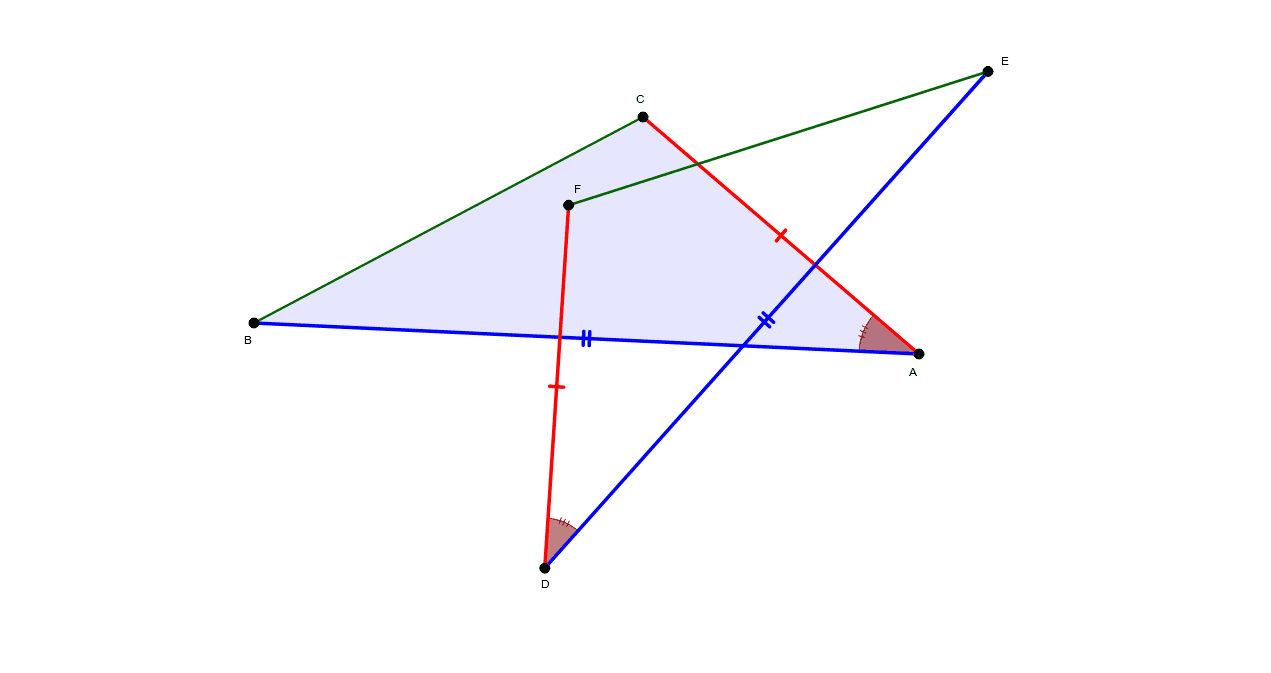
This GeoGebra example demonstrates the Side-Angle-Side (SAS) triangle congruence criterion by constructing a triangle from two sides and their included angle, then applying plane geometric transformations—reflection (mirror), rotation, and translation—to generate congruent images. Core mathematical concepts include SAS congruence, Euclidean transformations (reflection, rotation, translation), triangle geometry, and polygon construction. The construction uses GeoGebra commands Segment to draw sides AB, AC, and BC; Angle to construct the included angle α; Line for auxiliary construction; Polygon to create triangle poly1; Mirror for reflection; and Rotate for rotation. Objects such as A, B, C, a, b, c, α and their transformed counterparts A′, B′, C′, poly1′, poly1″ illustrate how side lengths and angle measures are preserved under isometries. Suitable for middle school geometry and high school transformation units, ideal for classroom demonstration or student inquiry into congruent figures and rigid motions.
GeoGebra Commands & Parameters
Segment(A, B) → cSegment(A, C) → bAngle(B, A, C) → αSegment(C, B) → aLine(D_1, E_1) → d_1Polygon(A, B, C) → poly1, c_1, a_1, b_1Mirror(A, d_1) → A'Mirror(B, d_1) → B'Mirror(C, d_1) → C'Polygon(A', B', C') → poly1', c', a', b'Mirror(A, d_1) → A'_1Mirror(C, d_1) → F_2Segment(A'_1, F_2) → e_1Mirror(A, d_1) → D_2Mirror(B, d_1) → B'_1Segment(D_2, B'_1) → f_1Mirror(C, d_1) → C'_2Mirror(B, d_1) → E_2Segment(C'_2, E_2) → d_2Rotate(A', 72.13°, F_1) → A''Rotate(B', 72.13°, F_1) → B''Rotate(C', 72.13°, F_1) → C''Polygon(A'', B'', C'') → poly1'', c'', a'', b''Rotate(A', 72.13°, F_1) → A''_1Rotate(B', 72.13°, F_1) → B''_1Rotate(C', 72.13°, F_1) → C''_1Polygon(A''_1, B''_1, C''_1) → poly1''_1, c''_1, a''_1, b''_1Rotate(D_2, 72.13°, F_1) → D'Rotate(B'_1, 72.13°, F_1) → ESegment(D', E) → fRotate(A'_1, 72.13°, F_1) → DRotate(F_2, 72.13°, F_1) → F'Segment(D, F') → eRotate(C'_2, 72.13°, F_1) → FRotate(E_2, 72.13°, F_1) → E'Segment(F, E') → dAngle(E, D, F) → β
AI Drawing Prompt Reference
Draw a triangle formed by two sides and their included angle, and show multiple congruent triangles obtained through reflection, rotation, and translation. Key objects include original triangle vertices A, B, C, their reflected counterparts A', B', C', rotated counterparts A'', B'', C'', and congruent triangles poly1, poly1', poly1''. The construction order is to first draw the original triangle, then reflect it to get congruent triangles, then rotate to obtain more congruent triangles, and finally show their relationships.
The prompt above was compiled from the original drawing commands and is for reference only.