
SAS Similar Triangles Dynamic Demonstration
Loading the math board and drawing, please wait…
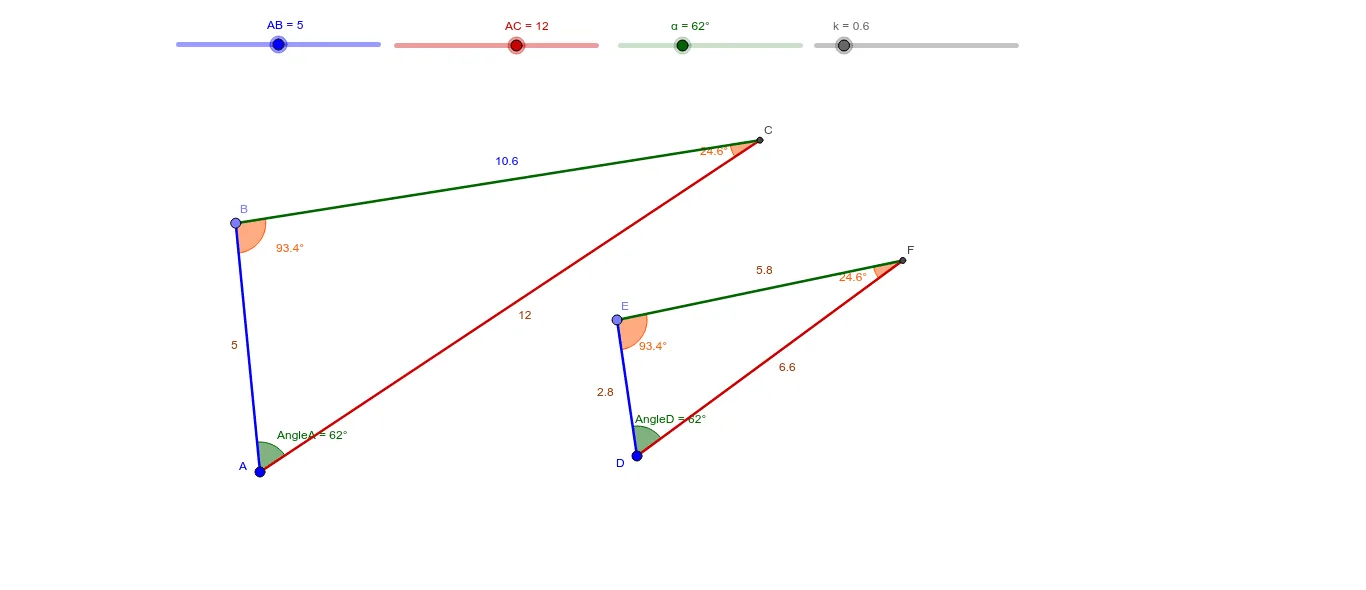
This GeoGebra example dynamically demonstrates the similarity of two triangles under the SAS (Side-Angle-Side) criterion, where two pairs of corresponding sides are proportional and the included angles are equal. The core mathematical concept is the SAS similarity theorem for triangles. The construction uses commands such as Circle, Point, Rotate, Angle, Line, Intersect, Polygon, and Segment to build the initial triangle and its rotated counterpart, with sliders (α, β, γ, etc.) controlling angles and side lengths to explore the similarity transformation interactively. It is suitable for middle school geometry classes or high school review of triangle similarity, and can also be used to investigate the relationship between similarity ratio and area ratio.
GeoGebra Commands & Parameters
Circle(A, AB) → cCircle(A, AC) → dPoint(c) → BRotate(B, (-α), A) → B'Angle(B', A, B) → AngleALine(A, B) → aLine(A, B') → bIntersect(d, b, 2) → CPolygon(B, A, C) → poly1, c_1, b_1, a_1Angle(A, B, C) → γAngle(B, C, A) → δCircle(D, (AB * k)) → eCircle(D, (AC * k)) → fPoint(e) → ERotate(E, (-α), D) → E'Angle(E', D, E) → AngleDLine(D, E) → gLine(D, E') → hIntersect(f, h, 2) → FPolygon(E, D, F) → poly2, f_1, e_1, d_1Angle(D, E, F) → βAngle(B, C, A) → εAngle(E, F, D) → ζSegment(A, B) → iSegment(D, E) → jSegment(A, C) → lSegment(D, F) → mSegment(C, B) → nSegment(F, E) → p