
SAS Congruence – GeoGebra Demo of Triangle SAS Axiom
Loading the math board and drawing, please wait…
In collections
Similarity and Congruence Year 8 Pedagogies in Practice
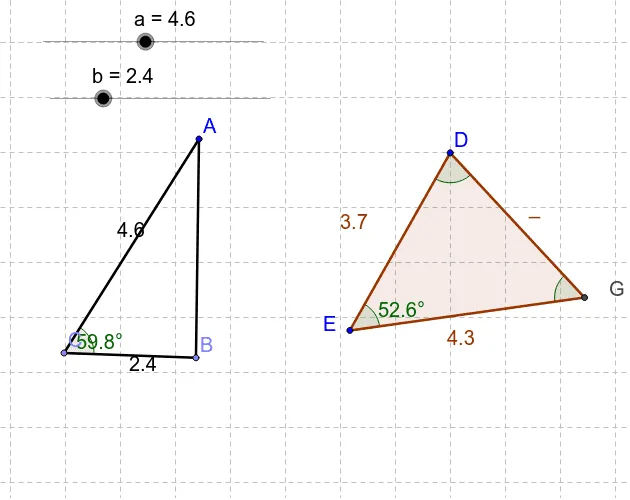
① This example illustrates how to verify triangle congruence using the SAS criterion. ② It covers triangle congruence, perpendicular bisectors, side‑angle relationships, and geometric proof techniques. ③ By employing GeoGebra commands Point, Polygon, Intersect, Angle, and Segment, the construction creates a triangle and measures its corresponding sides and included angles to confirm the SAS condition. ④ Designed for high school geometry classes and math Olympiad preparation, it provides an interactive way to intuitively validate geometric axioms.
GeoGebra Commands & Parameters
Point(Circle[D, 3.7092691579272596]) → EPolygon(D, E, F) → poly2, f, d, eIntersect(e, d) → GAngle(G, E, D) → δAngle(D, G, E) → εAngle(E, D, G) → ζPoint(Circle[A, a]) → CSegment(A, C) → cPoint(Circle[C, b]) → BSegment(C, B) → gSegment(A, B) → hAngle(B, C, A) → β
AI Drawing Prompt Reference
Draw a triangle ABC with AB=3.71, AC length a, and BC length b. Ensure the angles BAC and ABC are β and γ respectively. Draw points E and F to form triangle DEF, find the intersection G of lines DE and EF, measure angles DEG, EGD, and GED to verify if triangle ABC satisfies the SAS congruence criterion.
The prompt above was compiled from the original drawing commands and is for reference only.