
Sphere Created from Revolution by Mathguru
Loading the math board and drawing, please wait…
In collections
Volume of Revolution
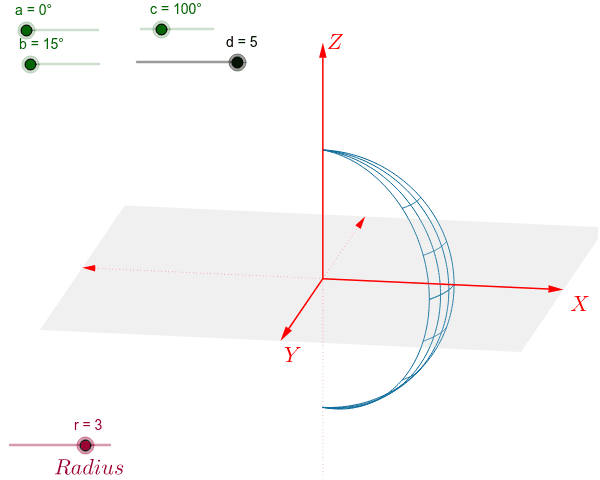
This example demonstrates the process of generating a sphere through revolution. Key mathematical concepts include solid geometry and coordinate geometry. Using GeoGebra commands such as vector and sequence, the revolution body can be constructed. Suitable for high school and above students to learn about solid geometry and revolution bodies.
GeoGebra Commands & Parameters
Vector(1.1 * d * W_x) → uVector(1.1 * d * W_y) → vVector(1.1 * d * W_z) → wPolygon(1.1 * d * (W_x + W_y), 1.1 * d * (-W_x + W_y), 1.1 * d * (-W_x - W_y), 1.1 * d * (W_x - W_y)) → poly1, g, h, i, jSequence(CurveCartesian[x(r * cos(0.157 * i) * W_z + r * sin(0.157 * i) * (cos(0.157 * j) * W_x + sin(0.157 * j) * W_y)), y(r * cos(0.157 * i) * W_z + r * sin(0.157 * i) * (cos(0.157 * j) * W_x + sin(0.157 * j) * W_y)), i, 0, 20], j, 0, p) → list3Sequence(CurveCartesian[x(sqrt(r^(2) - i^(2)) * cos(0.157 * j) * W_x + sqrt(r^(2) - i^(2)) * sin(0.157 * j) * W_y + i * W_z), y(sqrt(r^(2) - i^(2)) * cos(0.157 * j) * W_x + sqrt(r^(2) - i^(2)) * sin(0.157 * j) * W_y + i * W_z), j, 0, p], i, 0, r, 1) → list1Sequence(CurveCartesian[x(sqrt(r^(2) - i^(2)) * cos(0.157 * j) * W_x + sqrt(r^(2) - i^(2)) * sin(0.157 * j) * W_y - i * W_z), y(sqrt(r^(2) - i^(2)) * cos(0.157 * j) * W_x + sqrt(r^(2) - i^(2)) * sin(0.157 * j) * W_y - i * W_z), j, 0, p], i, 0, r, 1) → list2
AI Drawing Prompt Reference
Draw a sphere generated by revolution. First, create three vectors u, v, and w. Then, construct a quadrilateral poly1. Next, use curves to generate sequence list3, representing the upper half of the sphere. Finally, generate two sequences list1 and list2, representing the lower half of the sphere.
The prompt above was compiled from the original drawing commands and is for reference only.