
Cube Construction
Loading the math board and drawing, please wait…
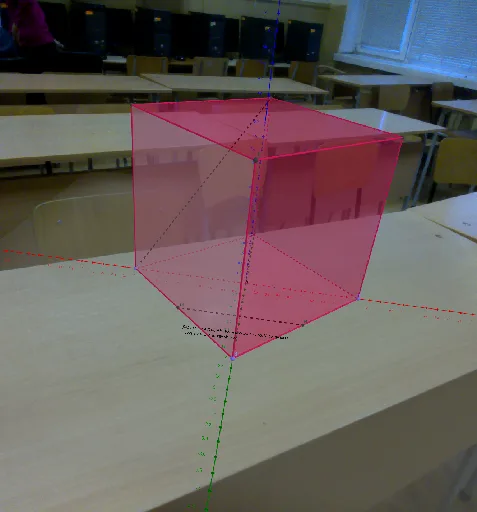
This example demonstrates the construction of a cube. Key mathematical concepts include solid geometry, points, lines, and faces of a cube. Using GeoGebra commands such as Point, Cube, Midpoint, Segment, etc., the various faces and edges of the cube are constructed. Suitable for middle school and above students or teachers for teaching and learning solid geometry.
GeoGebra Commands & Parameters
Point(xAxis) → APoint(yAxis) → BPoint(Circle[B, Distance[A, B], Segment[A, B]]) → CCube(A, B, C) → a_1, D, faceCDHG, faceEFGH, edgeAD, edgeAB, edgeBC, edgeCD, edgeAE, edgeDH, edgeEH, edgeEF, E, edgeBF, edgeFG, edgeCG, edgeGH, F, G, H, faceABCD, faceADHE, faceABFE, faceBCGFMidpoint(A, B) → MMidpoint(B, C) → NSegment(M, N) → fSegment(A, H) → gSegment((A * Horizontal), (C * Horizontal)) → hAngle((H * Horizontal), A, (C * Horizontal)) → αSegment((C * a), (H * a)) → i
AI Drawing Prompt Reference
In 3D space, start by placing three points: one on the x-axis, one on the y-axis, and the third on a circle centered at the second point with radius equal to the distance between the first two points. Using these three points as a base, construct a complete cube with six faces, twelve edges, and eight vertices. Then, take the midpoints of the first and second edges and connect them with a segment. Next, draw a segment from the first vertex to the opposite vertex of the cube. After that, on the horizontal projection plane, connect the horizontal projections of the first and third vertices, and also connect the horizontal projections of the third and opposite vertices, marking the angle between these two horizontal lines. Finally, in the vertical direction, draw a segment connecting the vertical projections of the third and opposite vertices.
The prompt above was compiled from the original drawing commands and is for reference only.