
Cube Net by sandreeva2001
Loading the math board and drawing, please wait…
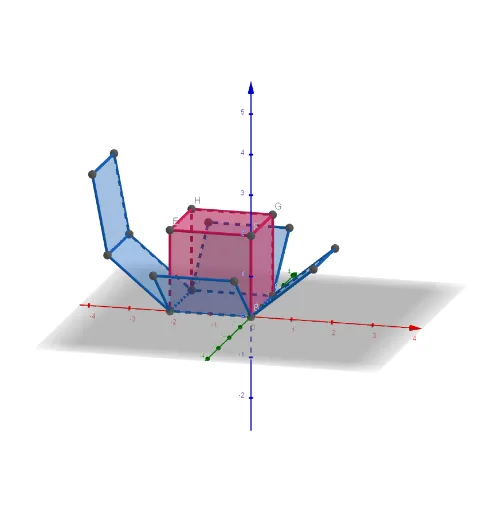
This example demonstrates the net of a cube. It involves the concept of unfolding and folding in solid geometry. Using GeoGebra commands such as Point, Intersect, Cube, Net, etc., the faces and edges of the cube can be constructed. Suitable for students at middle school level and above.
GeoGebra Commands & Parameters
Point(xAxis) → AIntersect(yAxis, zAxis) → BPoint(Circle[B, Distance[A, B], Segment[A, B]]) → CCube(A, B, C) → a, D, faceCDHG, faceEFGH, edgeAD, edgeAB, edgeBC, edgeCD, edgeAE, edgeDH, edgeEH, edgeEF, E, edgeBF, edgeFG, edgeCG, edgeGH, F, G, H, faceABCD, faceADHE, faceABFE, faceBCGFNet(a, b) → c, I, R, S, T, U, V, faceIJKL, faceILNM, faceIJRQ, faceJKTS, faceKLVU, J, faceMNOP, edgeIL, edgeIJ, edgeJK, edgeKL, edgeLN, edgeMN, edgeIM, edgeIQ, edgeQR, K, edgeJR, edgeJS, edgeST, edgeKT, edgeKU, edgeUV, edgeLV, edgeNO, edgeOP, edgeMP, L, M, N, O, P, Q
AI Drawing Prompt Reference
In a 3D coordinate system, start by placing a point on the x-axis, then take the intersection of the y-axis and z-axis as the second vertex. Using the distance between these two points as a radius, pick a third point on a circle centered at the first point. Construct a cube from these three vertices, showing all its edges and faces. Then unfold the cube into a flat net, producing a planar arrangement of six connected squares, while preserving the positions of vertices and edges after unfolding.
The prompt above was compiled from the original drawing commands and is for reference only.