
Same Side Exterior Angles: Task 5
Loading the math board and drawing, please wait…
In collections
Parallel Lines and Related Angles: Guided Exploration
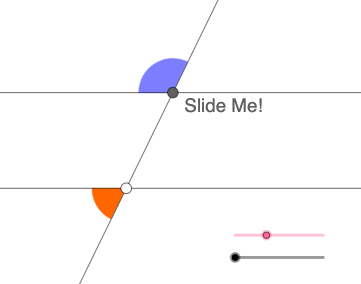
This example demonstrates how the relationship among same-side exterior angles arises when two lines are arranged (via constructing lines and using rotational placement to match corresponding intersections). The key mathematical ideas are exterior-angle properties for lines cut by a transversal, same-side angle relationships used for angle chasing, and precise angle measurement/marking. Construction-wise, it uses GeoGebra commands and objects such as Point (defining key vertices), Line/Ray/Segment (building the line elements that form the angle sides), Angle (creating and labeling the exterior angles), Intersect (finding intersection points for consistent configuration), Rotate (to generate corresponding angled positions), and Circle/CircleSector (to support the construction/visualization of angle regions). It is suitable for middle-school geometry instruction, geometry problem-solving practice, and interactive classroom exploration of angle theorems.
GeoGebra Commands & Parameters
Point(f) → ACircle(A, 2) → cIntersect(c, f, 2) → BRotate(B, (a * pi / 180), A) → B'Rotate(f, (b * pi / 180), A) → f'Intersect(c, f', 2) → FRotate(F, (a * pi / 180), A) → F'Angle(F, A, F') → αLine(A, F') → gIntersect(c, g, 1) → CRay(A, F') → hRay(A, C) → iIntersect(c, f', 1) → DRay(A, F) → jRay(A, C) → kRay(A, D) → lPoint(l) → EPoint(h) → GPoint(k) → HPoint(j) → ILine(G, j) → mCircle(G, 1) → dIntersect(d, m) → J, KIntersect(d, h) → L, MRay(G, K) → nRay(G, J) → pPoint(n) → OPoint(p) → PIntersect(d, h, 2) → QRay(G, Q) → qSegment(A, G) → rPoint(q) → NCircle(G, 1.5) → c_1Circle(A, 1.5) → d_1Intersect(c_1, n, 1) → RIntersect(c_1, q, 1) → SIntersect(c_1, p, 1) → TIntersect(c_1, r, 1) → UIntersect(d_1, j, 1) → VIntersect(d_1, r, 1) → WIntersect(d_1, l) → Z,Intersect(d_1, k, 1) → A_1CircleSector(G, R, S) → e_1CircleSector(G, S, T) → f_1CircleSector(G, T, U) → g_1CircleSector(G, U, R) → h_1CircleSector(A, V, W) → k_1CircleSector(A, W, Z) → p_1CircleSector(A, Z, A_1) → q_1CircleSector(A, A_1, V) → r_1
AI Drawing Prompt Reference
Draw a geometry diagram with a fixed vertex A and a line (call it f) passing through the plane. Construct a circle centered at A, then mark its intersection with f as point B. Using A as the rotation center, rotate B to B′ and rotate the line f to a new line f′ by the same angle. Intersect the circle with f′ to obtain F, then create and label the exterior angle at A formed by rays through F and F′ (angle α). From A, draw rays along the directions determined by the construction, producing corresponding intersections on the circle with additional points (including points like C and D) so that the exterior angles appear on the same side. Finally, use angle-region markings with circle sectors at A and at a key point G to visually emphasize the compared exterior angles.
The prompt above was compiled from the original drawing commands and is for reference only.