
Same-Side-Exterior Angles: Interactive Investigation
Loading the math board and drawing, please wait…
In collections
Congruence (CO) Cluster
CCSS High School: Geometry (Congruence) Volume 2
CCSS High School: Geometry (Congruence) Volume 2
CCSS High School: Geometry (Congruence) Volume 2
CCSS High School: Geometry (Congruence) Volume 2
Parallel Lines & Related Angles
Year 9 Mathematics
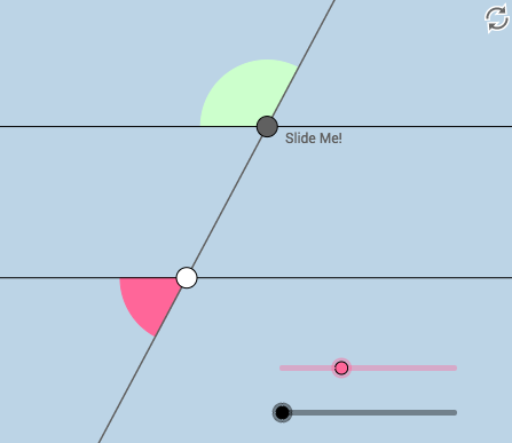
This example demonstrates the relationship between same-side exterior angles formed when a transversal intersects parallel lines. Key math concepts include properties of parallel lines, the same-side exterior angle theorem, and angle measurement. It utilizes GeoGebra commands and objects like Point, Circle, Intersect, Rotate, Angle, Line, Ray, Segment, and CircleSector. Suitable for middle school students and geometry teaching aids to understand parallel lines and angle relationships.
GeoGebra Commands & Parameters
Point(f) → ACircle(A, 2) → cIntersect(c, f, 2) → BRotate(B, (a * π / 180), A) → B'Rotate(f, (b * π / 180), A) → f'Intersect(c, f', 2) → FRotate(F, (a * π / 180), A) → F'Angle(F, A, F') → αLine(A, F') → gIntersect(c, g, 1) → CRay(A, F') → hRay(A, C) → iIntersect(c, f', 1) → DRay(A, F) → jRay(A, C) → kRay(A, D) → lPoint(l) → EPoint(h) → GPoint(k) → HPoint(j) → ILine(G, j) → mCircle(G, 1) → dIntersect(d, m) → J, KIntersect(d, h) → L, MRay(G, K) → nRay(G, J) → pPoint(n) → OPoint(p) → PIntersect(d, h, 2) → QRay(G, Q) → qSegment(A, G) → rPoint(q) → NCircle(G, 1.5) → c_1Circle(A, 1.5) → d_1Intersect(c_1, n, 1) → RIntersect(c_1, q, 1) → SIntersect(c_1, p, 1) → TIntersect(c_1, r, 1) → UIntersect(d_1, j, 1) → VIntersect(d_1, r, 1) → WIntersect(d_1, l) → Z,Intersect(d_1, k, 1) → A_1CircleSector(G, R, S) → e_1CircleSector(G, S, T) → f_1CircleSector(G, T, U) → g_1CircleSector(G, U, R) → h_1CircleSector(A, V, W) → k_1CircleSector(A, W, Z) → p_1CircleSector(A, Z, A_1) → q_1CircleSector(A, A_1, V) → r_1
AI Drawing Prompt Reference
Draw two parallel lines intersected by a transversal. Create a circle on one side of the transversal, intersecting it at two points. Rotate one intersection point around the other by angle a to get a new point. Rotate the transversal by angle b to get a new line. Measure the angle between the rotated point and the original point, and the angle between the new line and the original point. Connect the points with rays to form multiple angles. Draw two circles centered at the rotated point, intersecting the rays to get several intersection points. Create sectors between these points to illustrate the angle relationships.
The prompt above was compiled from the original drawing commands and is for reference only.