
Rugby Conversion Kick Point Location
Loading the math board and drawing, please wait…
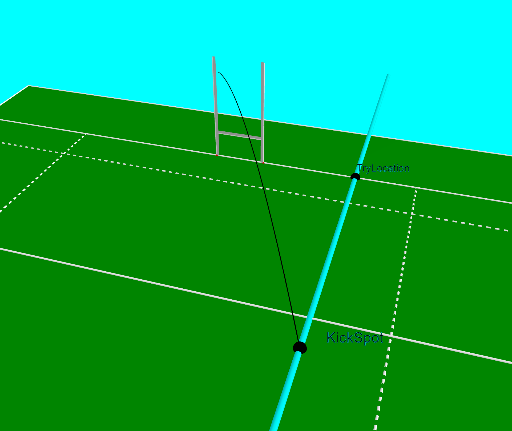
This example demonstrates how to determine the location of a rugby conversion kick point, involving concepts like circles, loci, and ratios. Construction uses GeoGebra commands such as Intersect, Locus, and OrthogonalLine. Suitable for high school students or math enthusiasts learning geometric construction and function graphing.
GeoGebra Commands & Parameters
Intersect(xAxis, yAxis) → APolygon(A, B, C, D) → poly1, a, b, c, dPoint(c) → TryLocationSegment((x(TryLocation), 50), (x(TryLocation), 100)) → kicksegmentOrthogonalLine(TryLocation, c) → a_2Point(kicksegment) → KickSpotVector(KickSpot, centreposts) → goaldirectionOrthogonalLine(G, d) → eOrthogonalLine(F, d) → fOrthogonalLine(E, d) → gIntersect(e, b) → HIntersect(f, b) → IIntersect(g, b) → JPolygon(M, D, C, N) → poly2, m, d_1, c_1, nPolygon(A, K, L, B) → poly3, a_1, k, l, b_1Segment(O, A_1) → hSegment(P, B_1) → iSegment(Z, W) → jSegment(Q, U) → pSegment(R, V) → qSegment(T, S) → rSegment(D, C) → sSegment(F, I) → t_2Segment(A, B) → e_1Segment(M, K) → f_1Segment(K, L) → g_1Segment(L, N) → h_1Segment(N, M) → i_1Segment(C_1, D_1) → j_1Segment(G_1, H_1) → k_1Segment(I_1, J_1) → l_1Segment(E_1, F_1) → m_1Segment(L_1, K_1) → n_1Segment(N_1, M_1) → p_1Segment(Q_1, O_1) → q_1Segment(R_1, P_1) → r_1Segment(G, H) → s_1Segment(E, J) → t_1Segment(Q, KickSpot) → b_2Segment(KickSpot, R) → c_2Angle(R, KickSpot, Q) → αOrthogonalLine(centreposts, c) → centrelineSegment(centreposts, TryLocation) → f_2Circle(Q, f_2) → g_2Intersect(g_2, centreline, 2) → centrecrossCircle(centrecross, Q) → h_2OrthogonalLine(centrecross, centreline) → i_2Intersect(h_2, i_2) → W_1, BestSpotLocus(BestSpot, TryLocation) → loc1OrthogonalPlane(KickSpot, goaldirection) → oCornerThreeD(-1, 11) → S_1CornerThreeD(-1, 11) → EPCornerThreeD(-1, 1) → T_1CornerThreeD(-1, 2) → U_1CornerThreeD(-1, 3) → V_1CornerThreeD(-1, 4) → Z_1CornerThreeD(-1, 5) → A_2CornerThreeD(-1, 6) → B_2CornerThreeD(-1, 7) → C_2Midpoint(CornerThreeD[-1, 1], CornerThreeD[-1, 7]) → VCENTREVector(VCENTRE - EP) → VDIRUnitVector(VDIR) → UVDIRCircle(Q, R, KickSpot) → d_2Vector(KickSpot, Aimspot) → kickdirUnitVector(kickdir) → unitkickdirLaTeX(α, true, true) → text1CurveCartesian(xball(tt), yball(tt), zball(tt), tt, 0, maxt) → u_1Intersect(d_2, a_2) → Anglespot1, Anglespot2Segment(Q, Anglespot1) → j_2Segment(R, Anglespot1) → k_2Segment(R, Anglespot2) → l_2Segment(Q, Anglespot2) → m_2Polygon(Q, U, U + (0.3, 0), Q + (0.3, 0)) → q1, q_2, u_2, n_2, r_2Polygon(T, S, S + (0, 0, 0.3), T + (0, 0, 0.3)) → q2, s_2, e_2, f_3, i_3Polygon(R, V, V + (-0.3, 0), R + (-0.3, 0)) → q3, r_3, v_2, g_3, h_3
AI Drawing Prompt Reference
Draw a rugby field with try line, goal line, and center line. From the try point, draw a vertical line to the goal line to mark the kick spot. Create a circle centered at the kick spot intersecting the goal line at two points. Then, draw two lines perpendicular to the center line and the line connecting the kick spot to one of the circle's intersection points, finding their intersection as the best spot for a conversion kick.
The prompt above was compiled from the original drawing commands and is for reference only.