
Circle Tangents
Loading the math board and drawing, please wait…
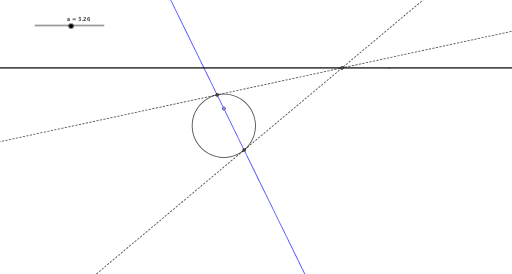
This example demonstrates how to construct tangents to a circle. The key mathematical concepts involve geometric construction, properties of circles, and loci. The construction uses GeoGebra commands such as Circle, Point, Rotate, Line, Intersect, Tangent, and Locus. It is suitable for high school students or math enthusiasts.
GeoGebra Commands & Parameters
Circle((0, 0), 2) → cPoint(yAxis) → GCircle(G, 1) → dPoint(d) → CRotate(C, a, G) → C'Line(G, C') → gIntersect(c, g) → A, ETangent(A, c) → f,Tangent(E, c) → h,Intersect(f, h) → FLocus(F, a) → loc1
AI Drawing Prompt Reference
Draw a circle with center at the origin and radius 2. Take a point G on the y-axis. Draw a circle with center G and radius 1, labeled C. Rotate point C around G by angle a to get C'. Draw line g from G to C'. Find intersection points A and E of line g with circle c. Draw tangents f from A and h from E to circle c. Find intersection point F of tangents f and h. Show the locus of F as angle a varies. This is a geometric construction demonstrating circle tangents and locus.
The prompt above was compiled from the original drawing commands and is for reference only.