
Rotational Symmetry of Cube by Anthony OR 柯志明 (2)
Loading the math board and drawing, please wait…
In collections
Rotations
Flip & turn
Rotational Symmetries of Platonic Solids
PDGE Year 1: Making Use of ICT Resources
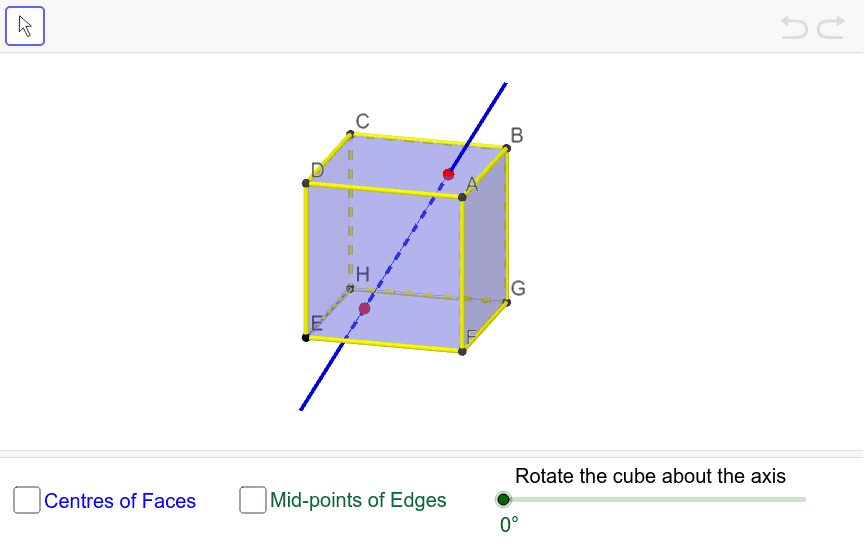
This example demonstrates the rotational symmetry of a cube. Key mathematical concepts include rotational symmetry and solid geometry. Using GeoGebra commands such as Cube, Rotate, and Midpoint, the construction of the cube and its rotational symmetry figures is illustrated. Suitable for students at the junior high school level and above.
GeoGebra Commands & Parameters
Cube(H, E, xOyPlane) → a, F, faceBCGF, faceCDHG, faceEFGH, edgeAD, edgeAB, edgeBC, edgeCD, edgeAE, edgeDH, edgeEH, G, edgeEF, edgeBF, edgeFG, edgeCG, edgeGH, C, D, A, B, faceABCD, faceADHE, faceABFEPointIn(faceABCD) → JPointIn(faceEFGH) → ILine(I, J) → bRotate(a, (-α), b) → a'Rotate(faceABCD, (-α), b) → faceABCD'Rotate(faceABFE, (-α), b) → faceABFE'Rotate(faceADHE, (-α), b) → faceADHE'Rotate(faceBCGF, (-α), b) → faceBCGF'Rotate(faceCDHG, (-α), b) → faceCDHG'Rotate(faceEFGH, (-α), b) → faceEFGH'Midpoint(D, B) → KMidpoint(H, F) → LMidpoint(edgeFG) → QMidpoint(edgeGH) → RMidpoint(edgeEH) → SMidpoint(edgeEF) → TMidpoint(edgeBC) → WMidpoint(edgeAD) → B_1Midpoint(edgeAB) → C_1Midpoint(edgeCD) → D_1
AI Drawing Prompt Reference
Draw a cube and demonstrate its rotational symmetry. First, construct the six faces of the cube. Then, select a point on one face and a point on the opposite face, connecting them with a line. Rotate the cube around this line by a certain angle to show the rotated version. Finally, find and mark the midpoints of key edges on the cube.
The prompt above was compiled from the original drawing commands and is for reference only.