
Rotation Transformations Demo by colinrchambers
Loading the math board and drawing, please wait…
In collections
rotations
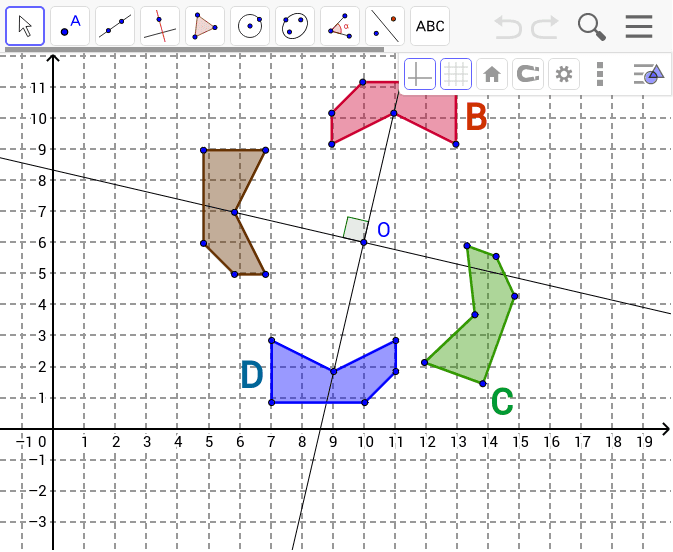
This example demonstrates the positional changes of shapes through rotation transformations. Key math concepts include rotation, geometric transformations, and angles. It is constructed using GeoGebra commands and objects like Polygon, Rotate, Line, OrthogonalLine, and Angle. Suitable for middle school students and above to learn and understand the properties of geometric transformations, as well as for teaching demonstrations.
GeoGebra Commands & Parameters
Polygon(A, B_1, C_1, D_1, E, H) → poly1, a, b, c, d, e, h_1Rotate(A, 270*°, O) → A'Rotate(B_1, 270*°, O) → FRotate(C_1, 270*°, O) → IRotate(D_1, 270*°, O) → D'Rotate(E, 270*°, O) → E'Rotate(H, 270*°, O) → H'Polygon(A', F, I, D', E', H') → poly1', a', f, i, d', e', h'Rotate(A', 250*°, O) → A''Rotate(F, 250*°, O) → F'Rotate(I, 250*°, O) → I'Rotate(D', 250*°, O) → D''Rotate(E', 250*°, O) → E''Rotate(H', 250*°, O) → H''Polygon(A'', F', I', D'', E'', H'') → poly1'', a'', f', i', d'', e'', h''Rotate(A'', 290*°, O) → A'''Rotate(F', 290*°, O) → F''Rotate(I', 290*°, O) → I''Rotate(D'', 290*°, O) → D'''Rotate(E'', 290*°, O) → E'''Rotate(H'', 290*°, O) → H'''Polygon(A''', F'', I'', D''', E''', H''') → poly1''', a''', f'', i'', d''', e''', h'''Line(C_1, O) → gOrthogonalLine(I, g) → hAngle(I, O, C_1) → α
AI Drawing Prompt Reference
Draw a pentagon ABCDE and a hexagon EFGHIH', first rotate ABCDE 270 degrees counterclockwise around point O to get EFGHIH', then rotate EFGHIH' 250 and 290 degrees counterclockwise around point O to get a new pentagon. Next, draw a line g passing through C1 and perpendicular to OC1, then draw a line h perpendicular to g and passing through I. Finally, measure the angle IOC1.
The prompt above was compiled from the original drawing commands and is for reference only.