
Rotation Exploration: Dynamic Angle and Geometry Interaction
Loading the math board and drawing, please wait…
In collections
Composition of transformations - Ms. Worthy
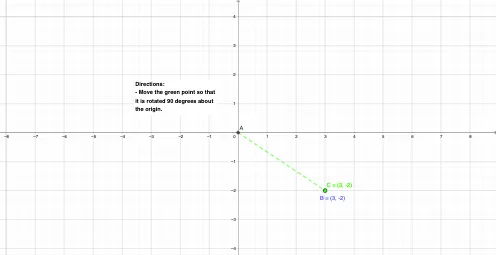
① This GeoGebra example dynamically demonstrates how a point rotates around a fixed point, showing changes in angle, segment length, and figure position, making the fundamental geometric transformation of rotation intuitive. ② Core mathematical concepts include rotation (transformation), angle measurement, segment length, intersection points, and the role of trigonometric functions (sine, cosine) in rotation, with additional tags like arithmetic mean and binomial distribution as context, but the main focus is geometric rotation. ③ Construction highlights: Using GeoGebra commands such as Intersect (to find intersection points), Segment (to construct segments), Distance (to measure lengths), Point (to create points), and Angle (to mark angles), with objects A, B, f (possibly a function or curve), text1 (text display), distanceAB (length of segment AB), C (rotating point), g (another curve or segment), and α (rotation angle). By adjusting α via a slider or input, users observe dynamic changes in the figure. ④ Suitable for middle school (basic geometric transformations) and high school (trigonometry) mathematics classrooms, either for teacher demonstrations or student self-exploration, to understand properties of rotation, relationships between angles and distances, and the impact of parameter changes in dynamic geometry.
GeoGebra Commands & Parameters
Intersect(xAxis, yAxis) → ASegment(A, B) → fDistance(A, B) → distanceABPoint(Circle[A, 3.61]) → CSegment(A, C) → gAngle(B, A, C) → α
AI Drawing Prompt Reference
Draw a dynamic rotation illustration showing a point rotating around a fixed point. Include an intersection point of two coordinate axes, a line segment connecting two points, the distance between them, a point on a circle centered at the intersection point with a specific radius, and a line segment connecting the center of the circle to the intersection point. Observe how the point rotates around the center as the angle changes, affecting the angle measure, segment length, and position of the figure, with the rotation angle displayed.
The prompt above was compiled from the original drawing commands and is for reference only.