
Reflecting over any two lines
Loading the math board and drawing, please wait…
In collections
Composition of transformations - Ms. Worthy
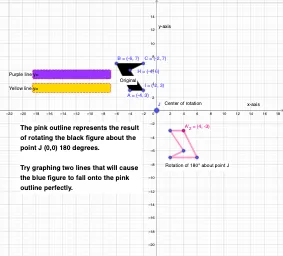
This example demonstrates geometric transformations by reflecting over any two lines. It involves core concepts like reflection symmetry, parallelograms, triangle properties, and geometric transformations. Constructed using commands like Point, Segment, Polygon, Mirror, Angle, Rotate in GeoGebra, suitable for high school and above to explore the properties and applications of geometric transformations.
GeoGebra Commands & Parameters
Point(yAxis) → DPoint(yAxis) → EPoint(xAxis) → FPoint(xAxis) → GSegment(A', B') → hSegment(B', C') → iSegment(C', A') → jSegment(A''_{1}, B''_{1}) → kSegment(B''_{1}, C''_{1}) → lSegment(C''_{1}, A''_{1}) → mPolygon(A, B, C, H, I) → poly1, a, b, c, h_1, i_1Textfield(p) → InputBox1Textfield(q) → InputBox2Mirror(A, q) → A'_{1}Mirror(B, q) → B'_{1}Mirror(C, q) → C'_{1}Mirror(H, q) → H'Mirror(I, q) → I'Polygon(A'_{1}, B'_{1}, C'_{1}, H', I') → poly1', a'_{1}, b'_{1}, c'_{1}, h', i'Mirror(A'_{1}, p) → A''Mirror(B'_{1}, p) → B''Mirror(C'_{1}, p) → C''Mirror(H', p) → H''Mirror(I', p) → I''Polygon(A'', B'', C'', H'', I'') → poly1'', j_1, k_1, l_1, h'', i''Angle(p, q) → αRotate(A, (-r), J) → A'_{2}Rotate(B, (-r), J) → B'_{2}Rotate(C, (-r), J) → C'_{2}Rotate(H, (-r), J) → H'_{1}Rotate(I, (-r), J) → I'_{1}Polygon(A'_{2}, B'_{2}, C'_{2}, H'_{1}, I'_{1}) → poly1'_{1}, a'_{2}, b'_{2}, c'_{2}, h'_{1}, i'_{1}
AI Drawing Prompt Reference
On a coordinate plane, draw a vertical line and a horizontal line as axes of reflection, each with two marked points. Construct a pentagon whose vertices consist of a triangle and two additional points. Reflect the entire pentagon across the horizontal axis to form a first mirrored image, then reflect that image across the vertical axis to obtain a second mirrored image. Also measure the angle between the two axes, and rotate the original pentagon around a fixed point by the negative of that angle. The final scene shows the original pentagon, the two reflected versions, and the rotated version, illustrating combined transformations of reflection and rotation.
The prompt above was compiled from the original drawing commands and is for reference only.