
Reflection Exploration: Interactive Mirror and Distance Learning
Loading the math board and drawing, please wait…
In collections
Composition of transformations - Ms. Worthy
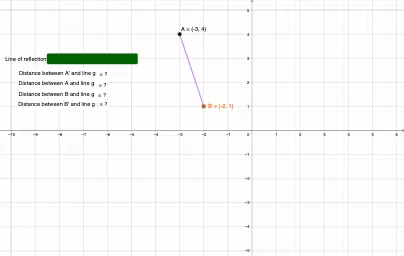
This GeoGebra example demonstrates the reflection (mirror) transformation of geometric figures across a line, showing the symmetric relationship between original points and their images. Core math concepts include reflection transformation, axis of symmetry, distance from a point to a line, and invariance of distances under reflection. Construction highlights: uses Segment to create segments, Textfield and InputBox1 for interactive input, Mirror command to generate reflected objects (A', B', f'), Distance command to measure distances from points to the mirror line (e.g., distanceAg, distanceA'g), and Text objects to display distance values in real time, verifying that distances are preserved. Suitable for middle school to high school students learning geometric transformations, and for teachers demonstrating reflection properties in class. Users can drag points or modify inputs to explore the behavior.
GeoGebra Commands & Parameters
Segment(A, B) → fTextfield(g) → InputBox1Mirror(A, g) → A'Mirror(B, g) → B'Segment(A', B') → f'Distance(B, g) → distanceBgDistance(B', g) → distanceB'gDistance(A, g) → distanceAgDistance(A', g) → distanceA'g
AI Drawing Prompt Reference
Draw a figure with two points A and B, and a line g as the mirror. Reflect points A and B across line g to get A' and B', and connect A' and B' to form line f'. Measure the distances from point B to line g (distanceBg), from point B' to line g (distanceB'g), from point A to line g (distanceAg), and from point A' to line g (distanceA'g). Drag points A or B, or modify the input for line g, to observe the changes in distances and verify the property of distance invariance under reflection.
The prompt above was compiled from the original drawing commands and is for reference only.