
Dynamic Slope Illustrator: Visualizing Difference Quotients
Loading the math board and drawing, please wait…
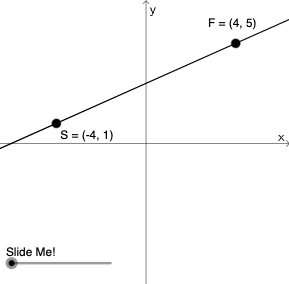
This example uses a dynamic construction to illustrate how the slope of a line through two points is determined by the horizontal and vertical differences (deltaX and deltaY), while simultaneously displaying slope-related expressions with correct sign and simplified fraction form. It centers on coordinate geometry concepts: slope, difference of coordinates as the basis of the “difference quotient,” and the analytic form of line parameters. The construction leverages GeoGebra commands such as Line, Segment, Intersect, and OrthogonalLine to build the geometric relationships; Angle, Distance, and Slope to compute and show geometric measures and the slope value; Midpoint, Mirror, and Dilate to create transformed auxiliary elements for a dynamic “illustrator” effect; Vector and Polygon to structure the diagram; and GCD, If, and FractionText to simplify and render the numerators/denominators with sign handling (e.g., numerator/denominator text objects). Suitable for middle and high school learners studying functions and analytic geometry, as well as classroom demonstrations and exploratory activities about slope and its sign.
GeoGebra Commands & Parameters
GCD(deltaY, deltaX) → GCDmGCD(numerYint, deltaX) → GCDyIf(sgn(deltaY / deltaX) ≥ 0, "", "-") → textSignNIf(sgn(numerYint / deltaX) > 0, "+", "-") → textSignIf(deltaXR ≟ 1, textSignN + deltaYR, textSignN + "\, \frac{" + deltaYR + "}{" + deltaXR + "}") → textslopeNIf(denomYintR ≟ 1, textSign + numerYintR, textSign + "\frac{" + numerYintR + "}{" + denomYintR + "}") → textYintIf(denomYintR ≟ 1, If[numerYintR ≟ 1, textSign, textSign + numerYintR], textSign + "\frac{" + numerYintR + "}{" + denomYintR + "}") → textMIDOrthogonalLine(B, xAxis) → a_2OrthogonalLine(A, yAxis) → cIntersect(a_2, c) → CLine(A, B) → dPolygon(A, B, C) → poly1, c_1, a_1, b_1Distance(B, C) → distanceBCDistance(A, C) → distanceACIntersect(a_2, c) → DSegment(A, D) → eSegment(C, B) → fGCD(deltaY_1, deltaX_1) → GCDm_1If(sgn(deltaY_1 / deltaX_1) ≥ 0, "", "-") → textSignN_1If(deltaXR_1 ≟ 1, textSignN_1 + deltaYR_1, textSignN_1 + "\, \frac{" + deltaYR_1 + "}{" + deltaXR_1 + "}") → textslopeN_1Line(A_1, B_1) → d_1Angle(B, D, A) → αSegment(A, B) → gGCD(deltaY_2, deltaX_2) → GCDm_2If(sgn(deltaY_2 / deltaX_2) ≥ 0, "", "-") → textSignN_2If(deltaXR_2 ≟ 1, textSignN_2 + deltaYR_2, textSignN_2 + "\, \frac{" + deltaYR_2 + "}{" + deltaXR_2 + "}") → textslopeN_2Line(A_2, B_2) → d_2Segment(A_2, B_2) → g_1GCD(deltaY_3, deltaX_3) → GCDm_3If(sgn(deltaY_3 / deltaX_3) ≥ 0, "", "-") → textSignN_3If(deltaXR_3 ≟ 1, textSignN_3 + deltaYR_3, textSignN_3 + "\, \frac{" + deltaYR_3 + "}{" + deltaXR_3 + "}") → textslopeN_3Line(A_3, B_3) → d_3Segment(A_3, B_3) → g_2Slope(g) → hDilate(A, If[0 < i ≤ 1, 1 - i, 0], D) → A'Vector(A, A') → uDilate(D, If[1 < i ≤ 2, 2 - i, 0], B) → D'Vector(D, D') → vLine(A, B) → jMidpoint(A, C) → EMirror(B, k) → B'Distance(A, B') → distanceAB'Distance(B', B) → distanceB'BPolygon(A, B', B) → t1, b_5, a_6, b'Dilate(A, If[0 < i ≤ 1, 1 - i, 0], B') → A'_1Vector(A, A'_1) → wDilate(B', If[1 < i ≤ 2, 2 - i, 0], B) → B''Vector(B', B'') → lIntersect(m, n) → FDilate(A, If[0 < i ≤ 1, 1 - i, 0], F) → A'_2Vector(A, A'_2) → pDilate(F, If[1 < i ≤ 2, 2 - i, 0], B) → F'Vector(F, F') → qDistance(A, F) → distanceAFDistance(F, B) → distanceFBPolygon(A, F, B) → t3, b_6, a_7, f_1FractionText(i_1) → text8
AI Drawing Prompt Reference
The graph consists of two fixed points A and B forming a line segment AB, with perpendicular lines a_2 to the x-axis and c to the y-axis intersecting at point C, creating a triangle. Slope expressions are displayed with sign and fraction forms, and a polygon connects A, B, and C. Dynamic transformation parts generate points A' and B' via scaling and vectors, with vectors u and v indicating directions, and a polygon connects A, B', and B, forming a graph with transformation elements.
The prompt above was compiled from the original drawing commands and is for reference only.