
Rotation Practice: Interactive Triangle Rotation Exploration
Loading the math board and drawing, please wait…
In collections
Composition of transformations - Ms. Worthy
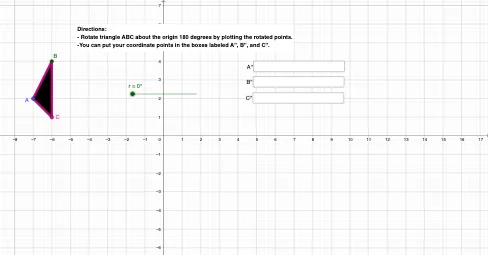
① This GeoGebra example demonstrates the rotation of a triangle around a point, allowing users to input an angle and observe the dynamic transformation of the shape. ② The core mathematical concept is geometric transformation, specifically rotation, covering the center of rotation, angle of rotation, the relationship between original and image points, and the property that rotation preserves shape and size (congruence). ③ Construction highlights: The Polygon command creates triangle ABC, Point defines the rotation center, Rotate generates the rotated triangle A'B'C', and an Angle object displays the rotation angle α. Textfield and InputBox allow users to enter custom angles, while Segment and Slider provide interactive feedback. ④ Suitable for middle school to high school students learning geometric transformations, and useful for teachers demonstrating rotation visually in class to reinforce the definition and properties of rotation.
GeoGebra Commands & Parameters
Polygon(A, B, C) → t1, c, a, bTextfield(A'') → InputBox1Textfield(B'') → InputBox2Textfield(C'') → InputBox3Segment(A'', B'') → fSegment(B'', C'') → gSegment(C'', A'') → hPoint(yAxis) → JRotate(A, r, J) → A'Rotate(B, r, J) → B'Rotate(C, r, J) → C'Polygon(A', B', C') → t1', c', a', b'Polygon(A'', C'', B'') → t2, b'', a'', c''Angle(A, J, A') → α
AI Drawing Prompt Reference
Draw a triangle ABC on a coordinate plane and choose a fixed rotation center J. Provide input for the rotation angle and use it to rotate points A, B, and C around J, producing the image triangle A'B'C'. Depict the rotated triangle by drawing its three corresponding sides A'B', B'C', and C'A'. Also construct the segments among the user-provided points A'', B'', and C'' to show the related triangle edges A''B'', B''C'', and C''A''. Finally, at vertex J, display the rotation angle α between the ray JA and JA'.
The prompt above was compiled from the original drawing commands and is for reference only.