
Discovering Trig Ratios: Dynamic Rotation and Right Triangle Relationships
Loading the math board and drawing, please wait…
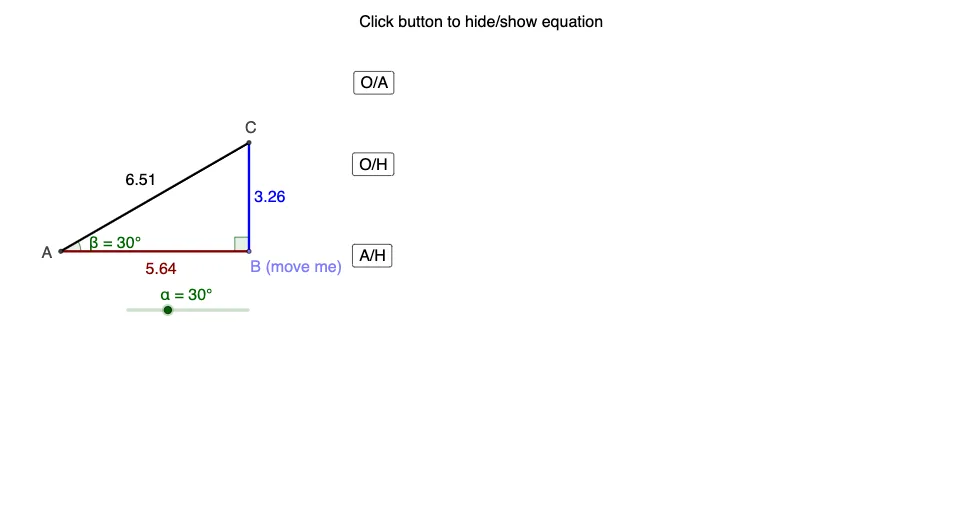
This GeoGebra example dynamically demonstrates the definitions and variations of trigonometric ratios (sine, cosine, tangent) in right triangles through rotation and geometric construction. The core mathematical concepts include trigonometric ratios, angle rotation, side-angle relationships in right triangles, and geometric transformations. Construction highlights: using commands such as Intersect, Point, Rotate, Angle, Line, OrthogonalLine, Segment, and Root, the applet builds objects like points A, B, B', C, D, E, F, G, angles α, β, γ, segments a, b, c, d, e, f, g, and interactive buttons (button1, button1_1, button1_2) with text labels (text1-text4) to control the rotation and display numerical values. Suitable for middle school advanced students or high school beginners to explore trig ratios, and for teachers to demonstrate how ratios remain constant despite changing triangle sizes, fostering conceptual understanding through interactive manipulation.
GeoGebra Commands & Parameters
Intersect(xAxis, yAxis) → APoint(xAxis) → BRotate(B, α, A) → B'Angle(B, A, B') → βLine(B', A) → aOrthogonalLine(B, xAxis) → bIntersect(a, b) → CSegment(A, B) → cSegment(B, C) → dSegment(C, A) → eAngle(C, B, A) → γRoot(a) → DIntersect(a, yAxis) → ERoot(b) → FIntersect(b, yAxis) → G
AI Drawing Prompt Reference
Draw a coordinate plane with the x- and y-axes, choose a fixed center point on the axes, and place another point to be rotated around the center by a controllable angle. Mark the rotation angle at the center and draw the line through the rotated point and the center. Through the rotated point construct a line perpendicular to the x-axis and find its intersection with the first line to obtain a third point, forming a right-triangle arrangement with the center and the original point. Show the relevant triangle sides as segments between the key points, and label the second internal angle associated with the triangle. Finally, create the intersections of the involved lines with the coordinate axes to display the corresponding points used for observing how side-length relationships and angle measures change under rotation.
The prompt above was compiled from the original drawing commands and is for reference only.