
SCARA Kinematics Simulation: Geometric Demonstration of Rotation and Translation
Loading the math board and drawing, please wait…
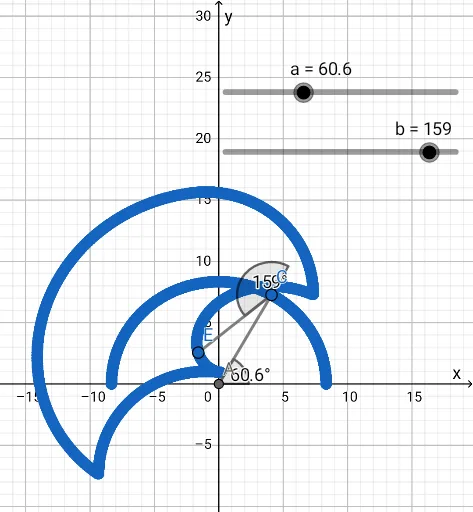
① This GeoGebra example dynamically simulates the planar kinematics of a SCARA robot, illustrating how the end effector moves under the influence of revolute and prismatic joints. ② Core mathematical concepts include rotation, translation, angles, line segments, and trigonometric functions, with underlying applications of matrix transformations and the Pythagorean theorem in geometric calculations. ③ Construction highlights: using GeoGebra commands such as Intersect, Point, Rotate, Angle, Line, and Segment, the model defines key points (A, B, C, D, E) and auxiliary lines (f, g, h), with parameters α, β, γ, δ controlling joint rotations and intermediate points B', D' generated to visualize the kinematic chain. ④ Suitable for high school or early university students learning robot kinematics, geometric transformations, and parametric modeling, as well as for STEM education demonstrating the practical integration of mathematics and engineering.
GeoGebra Commands & Parameters
Intersect(xAxis, yAxis) → APoint(xAxis) → BRotate(B, α, A) → B'Angle(B, A, B') → βLine(A, B') → fPoint(f) → CSegment(A, C) → gPoint(f) → DRotate(D, γ, C) → D'Angle(D, C, D') → δLine(C, D') → hPoint(h) → ESegment(E, C) → i
AI Drawing Prompt Reference
Draw a planar robot arm schematic: start with a fixed base at the origin, place a movable point on the horizontal axis as the first joint. Rotate this first joint around the base by an angle, creating a slanted line from the base, and mark that angle. Pick a point on this line as the second joint, connect the base to it with a segment. Then choose another point on the same line, rotate it around the second joint by a second angle, forming another slanted line, and mark that angle. Place the end effector on this second line, connect it to the second joint with a segment. Use sliders to control both rotation angles, showing how the two-link chain combines rotation and translation.
The prompt above was compiled from the original drawing commands and is for reference only.