
Rotating Rectangle
Loading the math board and drawing, please wait…
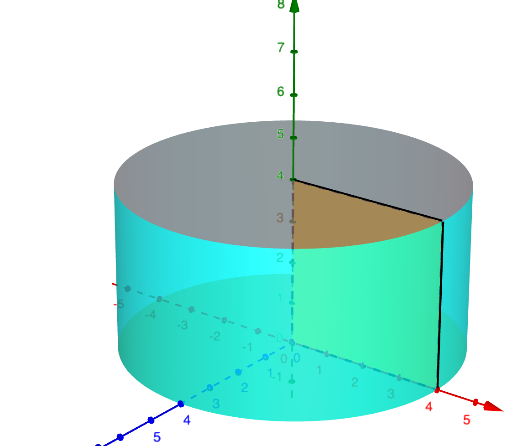
This example demonstrates the rotation of a rectangle around its center to form a cylinder, involving concepts in solid geometry, vectors, trigonometric functions, matrices, and coordinate geometry. Key GeoGebra commands used include Point, Intersect, Polygon, Rotate, Mirror. Suitable for high school and above students learning spatial geometry, vector and matrix applications, and rotational motion in physics.
GeoGebra Commands & Parameters
Point(yAxis) → APoint(xAxis) → BIntersect(xAxis, yAxis) → CPolygon(C, A, D, B) → q1, c, a, d, bRotate(C, (-turn), yAxis) → C'Rotate(A, (-turn), yAxis) → A'Rotate(D, (-turn), yAxis) → D'Rotate(B, (-turn), yAxis) → B'Polygon(C', A', D', B') → q1', c', a', d', b'Mirror(Surface[d, turn, yAxis], Plane[xAxis, yAxis]) → eMirror(Surface[a, turn, yAxis], Plane[xAxis, yAxis]) → fMirror(Surface[b, turn, yAxis], Plane[xAxis, yAxis]) → g
AI Drawing Prompt Reference
Draw a rectangle and rotate it around its center to demonstrate the formation of a cylinder, involving vectors, trigonometric functions, matrices, and coordinate geometry. Start by sketching the rectangle, then rotate its four vertices in sequence, and finally mirror the rotated rectangle across a plane perpendicular to the rotation axis to complete the cylindrical surface.
The prompt above was compiled from the original drawing commands and is for reference only.