
Rotating Polygons Around an Axis
Loading the math board and drawing, please wait…
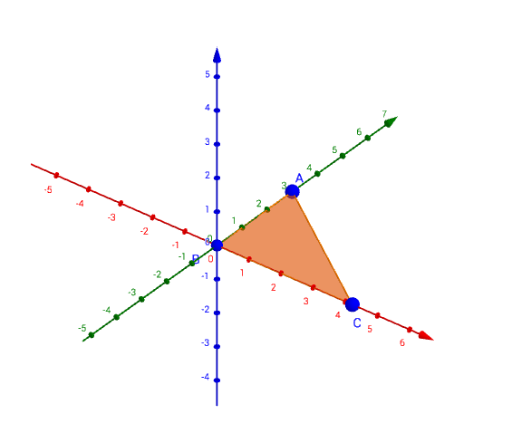
This example demonstrates the 3D shape and locus formed by rotating polygons around an axis. Key math concepts include polygons, 3D vectors, rotation transformations, and the generation of cylindrical surfaces. GeoGebra commands used in construction are Point, Intersect, Polygon, Rotate, CurveCartesian, and Surface. Suitable for high school solid geometry and analytical geometry instruction, enhancing spatial visualization skills.
GeoGebra Commands & Parameters
Point(yAxis) → AIntersect(xAxis, yAxis) → BPoint(xAxis) → CPolygon(A, B, C) → poly1, c, a, bRotate(A, (-α), yAxis) → A'_1Rotate(B, (-α), yAxis) → B'_1Rotate(C, (-α), yAxis) → C_2Polygon(A'_1, B'_1, C_2) → poly1'_1, c'_1, a'_1, b'_1CurveCartesian(x(A) + (t * (x(C_2) - x(A))), y(A) + (t * (y(C_2) - y(A))), z(A) + (t * (z(C_2) - z(A))), t, 0, 1) → dCurveCartesian(x(B) + (t * (x(C_2) - x(B))), y(B) + (t * (y(C_2) - y(B))), z(B) + (t * (z(C_2) - z(B))), t, 0, 1) → eSurface((t * cos(u)), f(t), (t * sin(u)), t, 0, x(C), u, 0, α) → gSurface((t * cos(u)), 0, (t * sin(u)), t, 0, x(C), u, 0, α) → h