
Rotating Conics on a Cylinder
Loading the math board and drawing, please wait…
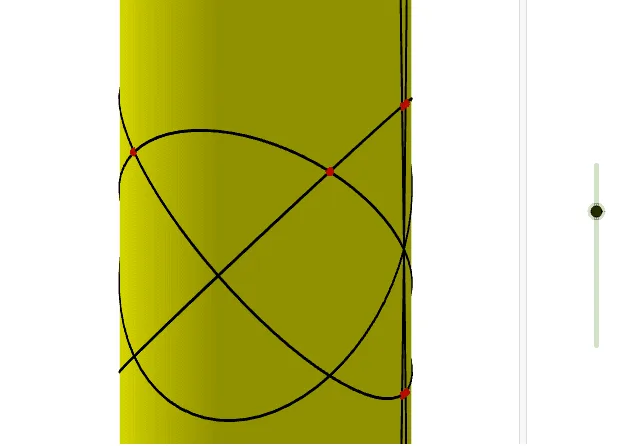
This example demonstrates the dynamic process of rotating conic sections around a cylinder. Key mathematical concepts include cylinder, conic sections, trigonometry, and transformation. Using GeoGebra commands such as Cylinder, Rotate, and IntersectPath, the rotated conic sections are constructed. Suitable for high school mathematics education, particularly in coordinate geometry and trigonometry.
GeoGebra Commands & Parameters
Cylinder((0, 0, -10), (0, 0, 10), 1) → a, c, d, bPlane(xAxis, yAxis) → eRotate(e, t, xAxis) → e'Rotate(e, (-t), yAxis) → e'_1Rotate(e, (-t), xAxis) → e'_2Rotate(e, t, yAxis) → e'_3IntersectPath(e', a) → fIntersectPath(e'_1, a) → gIntersectPath(e'_2, a) → hCorner(h) → A, B, C, DIntersectPath(e'_3, a) → kCorner(k) → E, F, G, HRotate(e, (2 * t), xAxis) → e'_4Rotate(e, (-((2 * t))), xAxis) → e'_5IntersectPath(e'_4, a) → pCorner(p) → E_1, F_1, G_1, H_1IntersectPath(e'_5, a) → qCorner(q) → I_1, J_1, K_1, L_1Intersect(g, p) → I, J, ,Intersect(q, k) → K, L, ,Intersect(k, p) → M, N, ,Intersect(g, b) → O, R, S, TIntersect(g, q) → P, Q, ,Intersect(h, g) → U, V, ,Intersect(h, b) → W, B_1, C_1, D_1Intersect(h, k) → Z, A_1, ,
AI Drawing Prompt Reference
Draw a cylinder and rotate conic sections on its surface. Start by creating a plane perpendicular to the cylinder's axis, then rotate it around the axis to form multiple tilted sections. Intersect these sections with the cylinder's surface to get several intersection lines. Finally, connect the vertices of these lines to form a rotating conic section pattern, demonstrating the dynamic rotation process.
The prompt above was compiled from the original drawing commands and is for reference only.