
Tangent-driven geometry with area links (rhombus and cuboid construction)
Loading the math board and drawing, please wait…
In collections
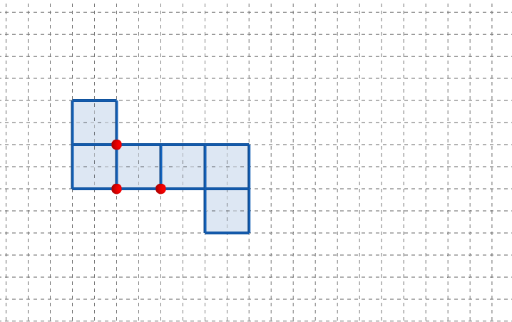
長方體有多少個摺紙圖樣?
This GeoGebra example demonstrates how a tangent-function parameter influences a composite geometry layout: as parameters change, related area relationships in planar triangles and a rhombus become visually traceable through a coordinated, rotatable construction. The key math ideas include tangent/trigonometric modeling of geometric proportions, area connections between triangles and rhombi, and the organization of dimensions for a related cuboid-style parameter set. Construction-wise, it uses GeoGebra commands such as Point to define the controlling points (including paired “primed” counterparts), Polygon to form the main shapes, and Rotate to align or spin parts of the figure so the relationships stay consistent. The object list indicates multiple parameter quantities (length/width/height variables like l, w, h, and a parameter t) and several indexed geometry points (e.g., q1, q2, q4 and their primed variants) that drive the configuration. Interactive buttons and text labels support switching between diagram groups. Suitable for secondary school geometry, integrated function modeling lessons, and classroom demonstrations of linking trigonometry with area reasoning.
GeoGebra Commands & Parameters
Point(Ray[(1, 0), (3, 0)]) → APoint(Ray[A + (1, 0), A + (2, 0)]) → CPoint(Ray[A + (0, 1), A + (0, 2)]) → BPolygon({(0, 0), A, B, (0, y(B))}) → q1Polygon({A, C, (x(C), y(B)), B}) → q2Polygon({B, B + (0, h), B + ((-l), h), B + ((-l), 0)}) → q4Polygon({C, C + (l, 0), C + (l, w), C + (0, w)}) → q5Polygon({C + (l, 0), C + (l + h, 0), C + (l + h, w), C + (l, w)}) → q6Rotate(q4, (90° * t), Line[(0, w), B]) → q4'Rotate(q2, (90° * t), Line[B, A]) → q2'Rotate(Rotate[q5, (90° * t), Line[C + (0, w), C]], (90° * t), Line[B, A]) → q5'Rotate(Rotate[Rotate[q6, (90° * t), Line[C + (l, w), C + (l, 0)]], (90° * t), Line[C + (0, w), C]], (90° * t), Line[B, A]) → q6'_{1}Polygon({C + (l, 0), C + (l, (-l)), C + (l + h, (-l)), C + (l + h, 0)}) → q3Rotate(Rotate[Rotate[Rotate[q3, (90° * t), Line[C + (l + h, 0), C + (l, 0)]], (90° * t), Line[C + (l, w), C + (l, 0)]], (90° * t), Line[C + (0, w), C]], (90° * t), Line[B, A]) → q3'
AI Drawing Prompt Reference
This is a geometric layout composed of triangles, a rhombus, and a cuboid shape. The layout is driven by control points, the parameter t, and length, width, and height variables (l, w, h). The parameter t influences the rotation and layout of these shapes, making the area relationships between planar triangles and the rhombus traceable. The construction order is to first define control points, then form the triangles and rhombus, and finally rotate parts of the shapes to maintain these relationships. This layout is suitable for demonstrations in secondary school geometry and integrated function modeling courses.
The prompt above was compiled from the original drawing commands and is for reference only.