
Rotating a Triangle Around an Axis
Loading the math board and drawing, please wait…
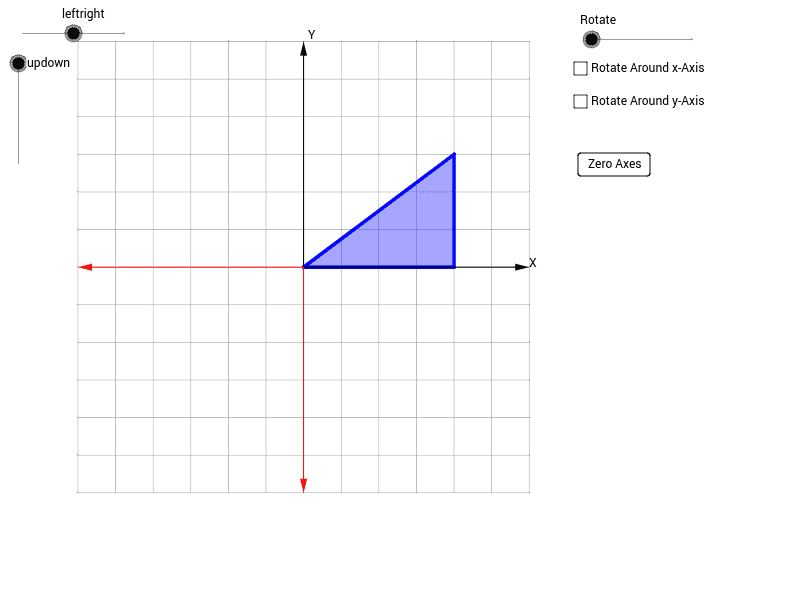
This example demonstrates the solid of revolution formed by rotating a triangle around an axis. Key mathematical concepts include rotation geometry and solid geometry. Using GeoGebra commands such as Intersect, Vector, and Polygon, the rotation process is visually illustrated. Suitable for high school math education to help students understand spatial geometric transformations.
GeoGebra Commands & Parameters
Intersect(xAxis, yAxis) → OVector(O, 6 * X) → pxVector(O, 6 * Y) → pyVector(O, 6 * Z) → pzPolygon(O, 4 * X, 3 * Y + 4 * X) → poly1, a, b, cCurveCartesian(x(4 * X + 3 * cos(n) * Y + 3 * sin(n) * Z), y(4 * X + 3 * cos(n) * Y + 3 * sin(n) * Z), n, 0, Rotate) → dSequence(Segment[O, (x(4 * X + 3 * cos(n) * Y + 3 * sin(n) * Z), y(4 * X + 3 * cos(n) * Y + 3 * sin(n) * Z))], n, 0, Rotate, 0.01) → list1Segment(O, A) → gSequence(Segment[4 * X, (x(4 * X + 3 * cos(n) * Y + 3 * sin(n) * Z), y(4 * X + 3 * cos(n) * Y + 3 * sin(n) * Z))], n, 0, Rotate, 0.01) → list2Polygon(O, A, 4 * X) → poly2, h, o, a_1CurveCartesian(x(4 * cos(n) * X + 0 * Y + 4 * sin(n) * Z), y(4 * cos(n) * X + 0 * Y + 4 * sin(n) * Z), n, 0, Rotate) → fCurveCartesian(x(4 * cos(n) * X + 3 * Y + 4 * sin(n) * Z), y(4 * cos(n) * X + 3 * Y + 4 * sin(n) * Z), n, 0, Rotate) → eSequence(Segment[O, (x(4 * cos(n) * X + 3 * Y + 4 * sin(n) * Z), y(4 * cos(n) * X + 3 * Y + 4 * sin(n) * Z))], n, 0, Rotate, 0.1) → list3Sequence(Segment[O, (x(4 * cos(n) * X + 0 * Y + 4 * sin(n) * Z), y(4 * cos(n) * X + 0 * Y + 4 * sin(n) * Z))], n, 0, Rotate, 0.1) → list4Sequence(Segment[(x(4 * cos(n) * X + 0 * Y + 4 * sin(n) * Z), y(4 * cos(n) * X + 0 * Y + 4 * sin(n) * Z)), (x(4 * cos(n) * X + 3 * Y + 4 * sin(n) * Z), y(4 * cos(n) * X + 3 * Y + 4 * sin(n) * Z))], n, 0, Rotate, 0.1) → list5Polygon(O, B, C) → poly3, c_1, o_1, b_1Sequence(Segment[n * X + 6 * Y, n * X - 6 * Y], n, -6, 6) → list9Sequence(Segment[-6 * X + n * Y, 6 * X + n * Y], n, -6, 6) → list10Sequence(CurveCartesian[x(4 / 3 * i * cos(n) * X + i * Y + 4 / 3 * i * sin(n) * Z), y(4 / 3 * i * cos(n) * X + i * Y + 4 / 3 * i * sin(n) * Z), n, 0, Rotate], i, 0, 3, 0.1) → list8Sequence(CurveCartesian[x(i * cos(n) * X + 0 * Y + i * sin(n) * Z), y(i * cos(n) * X + 0 * Y + i * sin(n) * Z), n, 0, Rotate], i, 0, 4, 0.1) → list7Sequence(CurveCartesian[x(4 * cos(n) * X + i * Y + 4 * sin(n) * Z), y(4 * cos(n) * X + i * Y + 4 * sin(n) * Z), n, 0, Rotate], i, 0, 3, 0.1) → list6
AI Drawing Prompt Reference
Draw a solid of revolution formed by rotating a triangle around the X-axis, illustrating the geometric transformation during rotation. Start by plotting the coordinate axes and origin, then draw the rotation axis and the triangle. Connect the origin to each vertex of the triangle with line segments and sketch the rotation paths. Finally, fill the solid with curves and lines to create a 3D effect.
The prompt above was compiled from the original drawing commands and is for reference only.