
Root Rectangles
Loading the math board and drawing, please wait…
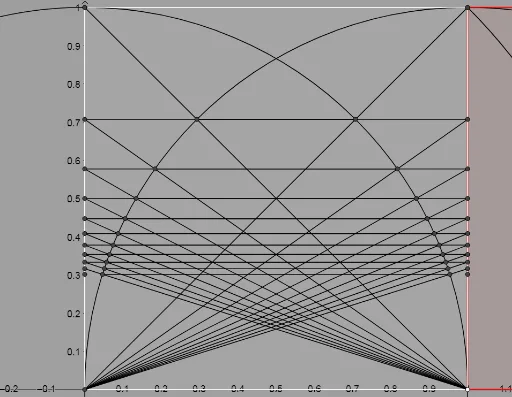
This example demonstrates the construction of root rectangles. A root rectangle is a special rectangle where the diagonal length is the square root of the side length. The core mathematical concepts involved include rectangles, vectors, and geometric construction. Using GeoGebra commands such as Point, Segment, and Polygon, the properties of root rectangles are visually illustrated. Suitable for middle school and above students to learn geometric construction and related concepts.
GeoGebra Commands & Parameters
Point(xAxis) → APoint(xAxis) → BPoint(xAxis) → DPoint(yAxis) → ESegment(O, P) → nPoint(xAxis) → CPoint(xAxis) → GPolygon(C, G, 4) → poly1, f, g, h, i, H, ISegment(C, H) → jLine(C, G) → kCircle(C, H) → cIntersect(c, k, 2) → JOrthogonalLine(J, k) → lLine(H, k) → mIntersect(l, m) → A_1Polygon(G, H, A_1, J) → q1, g_1, h_1, a_1, j_1Circle(C, A_1) → dIntersect(d, k, 2) → B_1Line(B_1, l) → pIntersect(m, p) → C_1Polygon(J, B_1, C_1, A_1) → q2, j_2, b_1, c_1, qCircle(C, C_1) → eIntersect(e, k, 2) → D_1Line(D_1, p) → rIntersect(m, r) → E_1Polygon(B_1, D_1, E_1, C_1) → q3, s, d_1, e_1, tCircle(C, E_1) → f_1Intersect(f_1, k, 2) → F_1Line(F_1, r) → aIntersect(m, a) → G_1Polygon(D_1, F_1, G_1, E_1) → q4, b, i_1, k_1, l_1Circle(C, G_1) → p_1Intersect(p_1, k, 2) → H_1Line(H_1, a) → m_1Intersect(m, m_1) → I_1Polygon(F_1, H_1, I_1, G_1) → q5, n_1, q_1, r_1, s_1Circle(C, I_1) → t_1Intersect(t_1, k, 2) → J_1Line(J_1, m_1) → f_2Intersect(m, f_2) → K_1Polygon(H_1, J_1, K_1, I_1) → q6, g_2, h_2, i_2, k_2Circle(C, K_1) → c_2Intersect(c_2, k, 2) → L_1Line(L_1, f_2) → l_2Intersect(m, l_2) → M_1Polygon(J_1, L_1, M_1, K_1) → q7, m_2, n_2, p_2, q_2Circle(C, M_1) → d_2Intersect(d_2, k, 2) → N_1Line(N_1, l_2) → r_2Intersect(m, r_2) → O_1Polygon(L_1, N_1, O_1, M_1) → q8, s_2, t_2, o_1, a_2CircleArc(C, J, H) → e_2CircleArc(C, B_1, A_1) → c_3CircleArc(C, D_1, C_1) → d_3CircleArc(C, F_1, E_1) → e_3CircleArc(C, J_1, I_1) → f_3CircleArc(C, H_1, G_1) → g_3CircleArc(C, L_1, K_1) → h_3CircleArc(C, N_1, M_1) → k_3Segment(G, I) → b_2Circle(C, G) → p_3Circle(G, C) → q_3Intersect(q_3, b_2, 1) → P_1Intersect(p_3, j, 1) → Q_1Line(P_1, Q_1) → i_3Intersect(i_3, i) → R_1Intersect(i_3, g) → S_1Distance(P_1, Q_1) → distanceP1Q1Intersect(p_3, i_3, 1) → T_1Segment(C, S_1) → j_3Segment(G, R_1) → l_3Intersect(p_3, j_3, 1) → U_1Intersect(q_3, l_3, 1) → V_1Line(V_1, U_1) → m_3Intersect(m_3, i) → W_1Intersect(m_3, g) → Z_1Distance(V_1, U_1) → distanceV1U1Segment(C, Z_1) → n_3Segment(G, W_1) → r_3Intersect(q_3, r_3, 1) → A_2Intersect(p_3, n_3, 1) → B_2Line(A_2, B_2) → s_3Intersect(s_3, i) → C_2Intersect(s_3, g) → D_2Distance(A_2, B_2) → distanceA2B2Segment(P_1, T_1) → t_3Segment(V_1, U_1) → a_3Segment(A_2, B_2) → b_3Segment(R_1, S_1) → f_4Segment(W_1, Z_1) → g_4Segment(C_2, D_2) → h_4Segment(C, D_2) → i_4Segment(G, C_2) → j_4Intersect(q_3, j_4, 1) → E_2Intersect(p_3, i_4, 1) → F_2Distance(E_2, F_2) → distanceE2F2Intersect(p_3, i_4, 1) → G_2Segment(C, Z_1) → k_4Polygon(C, G, 4) → poly2, l_4, m_4, n_4, p_4, H_2, I_2Line(E_2, G_2) → q_4Intersect(q_4, p_4) → J_2Intersect(q_4, g_1) → K_2Segment(C, K_2) → r_4Segment(G, J_2) → s_4Segment(E_2, G_2) → t_4Segment(J_2, K_2) → a_4Intersect(p_3, r_4, 1) → L_2Intersect(q_3, s_4, 1) → M_2Segment(M_2, L_2) → b_4Line(M_2, L_2) → c_4Intersect(c_4, p_4) → N_2Intersect(c_4, g_1) → O_2Segment(C, O_2) → d_4Segment(G, N_2) → e_4Segment(N_2, O_2) → f_5Intersect(q_3, e_4, 1) → P_2Intersect(p_3, d_4, 1) → Q_2Segment(P_2, Q_2) → g_5Line(P_2, Q_2) → h_5Intersect(h_5, p_4) → R_2Intersect(h_5, g_1) → S_2Segment(C, S_2) → i_5Segment(G, R_2) → j_5Intersect(q_3, j_5, 1) → T_2Intersect(p_3, i_5, 1) → U_2Segment(T_2, U_2) → k_5Segment(R_2, S_2) → l_5Line(T_2, U_2) → m_5Intersect(m_5, p_4) → V_2Intersect(m_5, g_1) → W_2Segment(C, W_2) → n_5Segment(G, V_2) → p_5Segment(V_2, W_2) → q_5Intersect(q_3, p_5, 1) → Z_2Intersect(p_3, n_5, 1) → A_3Segment(Z_2, A_3) → r_5Line(Z_2, A_3) → s_5Intersect(s_5, p_4) → B_3Intersect(s_5, g_1) → C_3Segment(B_3, C_3) → t_5Segment(C, C_3) → a_5Segment(G, B_3) → b_5Intersect(q_3, b_5, 1) → D_3Intersect(p_3, a_5, 1) → E_3Segment(D_3, E_3) → c_5Line(D_3, E_3) → d_5Intersect(d_5, p_4) → F_3Intersect(d_5, g_1) → G_3Segment(C, G_3) → e_5Segment(G, F_3) → f_6Intersect(q_3, f_6, 1) → H_3Intersect(p_3, e_5, 1) → I_3Segment(H_3, I_3) → g_6Line(H_3, I_3) → h_6Intersect(h_6, p_4) → J_3Intersect(h_6, g_1) → K_3
AI Drawing Prompt Reference
Draw a root rectangle by first creating points A, B, D, and C on the x-axis, and point E on the y-axis. Then, draw a circle with center C and radius H, intersecting line CH to get point J. Draw a perpendicular line to CH through J, intersecting the previous line to get point A1. Next, draw a circle with center A1 and radius C, intersecting line CH to get point B1, and continue this process to form a grid of root rectangles.
The prompt above was compiled from the original drawing commands and is for reference only.