
Right Triangle Coordinate Geometry Demo
Loading the math board and drawing, please wait…
In collections
barycentric coordinates
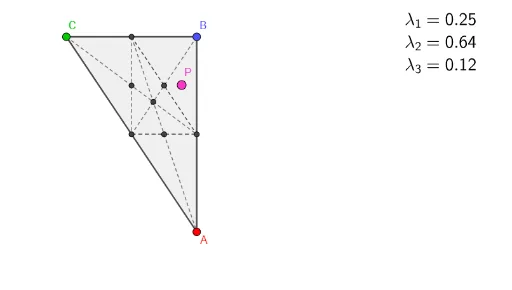
This example demonstrates the coordinate geometry properties of a right triangle and related elements. It involves core concepts like coordinate geometry, means, cube, incircle, algebra, and median value. Construction highlights include using GeoGebra commands such as Point, Segment, Line, Polygon, Midpoint, and Intersect to build the triangle and its associated features. Suitable for high school mathematics education and learning, helping to understand the application of analytical geometry in geometric problems.
GeoGebra Commands & Parameters
Point(yAxis) → BPoint(k) → CSegment(C, A) → fSegment(A, B) → gSegment(B, C) → hLine(A, B) → iLine(A, C) → jPolygon(A, B, C) → driehoek1, c, a, bMidpoint(A, C) → DMidpoint(A, B) → EMidpoint(C, B) → FSegment(C, E) → lSegment(B, D) → mSegment(F, A) → nIntersect(l, m) → GSegment(F, D) → pSegment(D, E) → qSegment(F, E) → rIntersect(l, p) → HIntersect(m, r) → IIntersect(n, q) → J
AI Drawing Prompt Reference
Draw a right triangle with labeled vertices and sides. Find the midpoints of each side and connect them to the opposite vertices to form medians. Then, draw the altitudes and angle bisectors, marking their intersections. Finally, include the incircle and the hexagon formed by the triangle's vertices, highlighting coordinate geometry properties and construction relationships.
The prompt above was compiled from the original drawing commands and is for reference only.