
Right Angled Triangles from Pythagorean Triple Generator
Loading the math board and drawing, please wait…
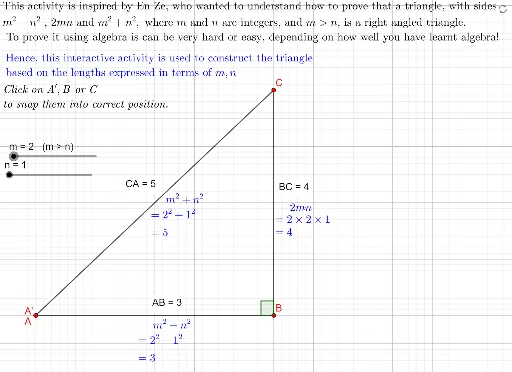
This activity uses a Pythagorean triple generator to help students visualize the relationship between right-angled triangles and the Pythagorean theorem. Key mathematical concepts include the Pythagorean theorem, right triangles, and trigonometry. Using GeoGebra commands such as Point, Segment, Distance, and Angle, the activity dynamically demonstrates the side length relationships in right-angled triangles. Suitable for middle school and above students learning geometry and trigonometry.
GeoGebra Commands & Parameters
Point(Circle[A, m^(2) - n^(2)]) → BSegment(A, B) → fPoint(Circle[B, (2 * (m * n))]) → CSegment(B, C) → gPoint(Circle[C, m^(2) + n^(2)]) → DSegment(C, D) → hDistance(A, B) → distanceABDistance(B, C) → distanceBCDistance(C, A) → distanceCADistance(C, D) → distanceCDPoint(g) → EPoint(f) → FAngle(F, B, E) → αPolygon(B, F, F', E) → q1, b, f_1, f', e
AI Drawing Prompt Reference
Draw a right-angled triangle using the Pythagorean theorem to generate the three sides. Start by creating point B on a circle centered at point A with radius m²-n², then draw segment AB as the first side. Next, create point C on a circle centered at B with radius 2mn, and draw segment BC as the second side. Then, create point D on a circle centered at C with radius m²+n², and draw segment CD as the third side. Measure the lengths of each side, calculate angle α, and finally draw a quadrilateral connecting these points.
The prompt above was compiled from the original drawing commands and is for reference only.