
Discovering Trig Ratios
Loading the math board and drawing, please wait…
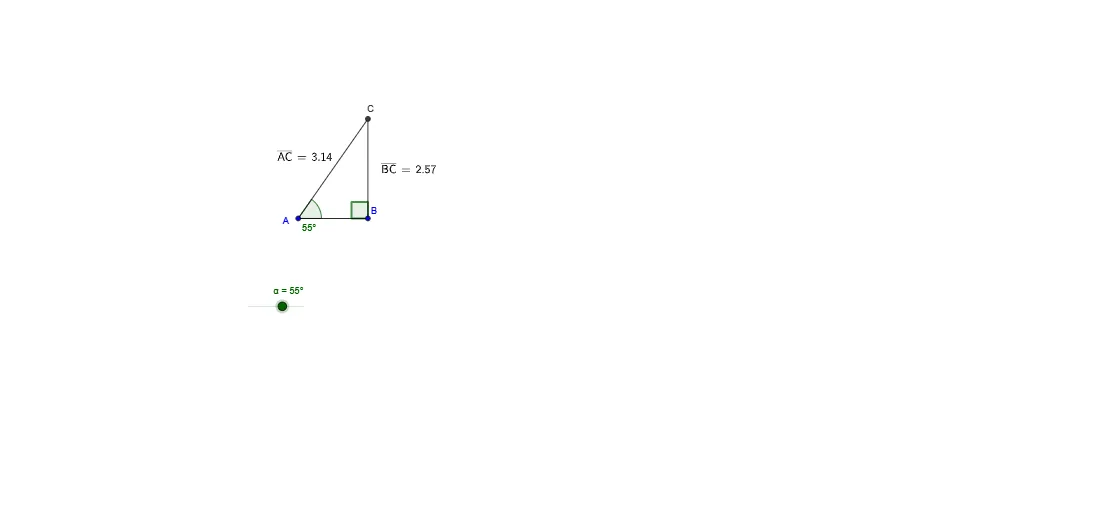
This example demonstrates how to explore trigonometric ratios using coordinate geometry methods. The core math concepts involved include triangles, coordinates, sine, cosine, and tangent functions. Construction highlights involve using GeoGebra commands such as Segment, OrthogonalLine, Rotate, Angle, Line, Intersect, and Distance to build the figure and calculate ratios. Suitable for high school mathematics teaching, helping students visually understand the definitions and properties of trigonometric functions.
GeoGebra Commands & Parameters
Segment(A, B) → aOrthogonalLine(B, a) → bRotate(B, α, A) → B'Angle(B, A, B') → βLine(A, B') → cIntersect(b, c) → CSegment(A, C) → dSegment(B, C) → eDistance(B, C) → distanceBCDistance(A, C) → distanceACDistance(B, A) → distanceBAAngle(C, B, A) → γ
AI Drawing Prompt Reference
Draw a right triangle with one horizontal leg and one vertical leg. From the right endpoint of the horizontal leg, draw a vertical line upward. Then rotate the right endpoint around the left endpoint by an arbitrary angle to get a new point. Connect this new point to the left endpoint to form a slanted line, which intersects the vertical line at a point—this becomes the third vertex of the triangle. Connect this vertex to both endpoints of the horizontal leg to complete the triangle. Finally, label the lengths of all three sides and mark one acute angle at the vertex where the horizontal leg meets the slanted side.
The prompt above was compiled from the original drawing commands and is for reference only.