
Properties of Right Triangles
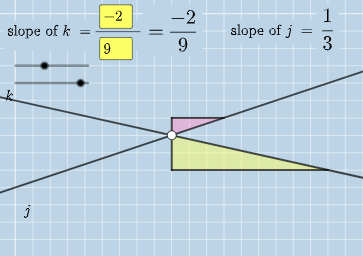
Loading the math board and drawing, please wait…
In collections
Exploring Parallel Lines in the Coordinate Plane
This example demonstrates the properties of right triangles, including the relationships between angles and sides. Using GeoGebra commands such as Intersect, Angle, and Textfield, it dynamically shows the relationships between the lengths and angles of right triangles. Suitable for middle and high school students learning trigonometric functions and geometric construction.
GeoGebra Commands & Parameters
Intersect(k, j) → CAngle(A, C, B) → αIntersect(k, eq3) → DAngle(A, D, B) → βIntersect(j, eq4) → EAngle(A, E, B) → γTextfield(a) → InputBox1Textfield(b) → InputBox2Textfield(c) → InputBox3Textfield(d) → InputBox4Polygon(A, F, G) → t1, g, a_1, fSegment(A, F) → hSegment(F, G) → iFractionText(a / b) → text4FractionText(c / d) → text5Polygon(B, H, I) → t2, i_1, b_1, h_1Segment(B, H) → lSegment(H, I) → m
AI Drawing Prompt Reference
Draw a right triangle ABC with A as the right angle. Use lines k and j to intersect with the sides of the triangle, marking points C, D, and E. Measure angles α, β, and γ, which are the angles at A, B, and C respectively. Input values a, b, c, and d into the input boxes, and display the fractions a/b and c/d. Draw the circumscribed rectangle of triangle ABC and measure its sides and angles.
The prompt above was compiled from the original drawing commands and is for reference only.