
Rhombus Transformation Demonstration
Loading the math board and drawing, please wait…
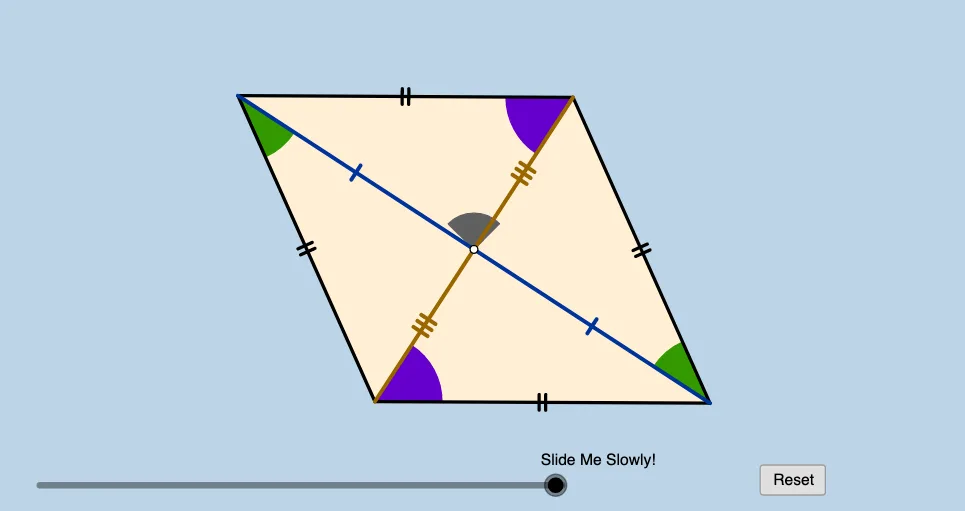
This GeoGebra applet demonstrates the properties of a rhombus through transformation geometry, without involving segment lengths and angle measures. Using commands like Circle, Line, Intersect, CircleArc, Point, Segment, Min, Dilate, Angle, Rotate, CircleSector, Polygon, Vector, Translate, students can intuitively understand the symmetry and properties of a rhombus. Suitable for middle school and above students learning geometric transformations.
GeoGebra Commands & Parameters
Circle(B, A) → fCircle(A, B) → cLine(A, B) → bIntersect(c, b, 2) → CCircleArc(A, B, C) → dPoint(d) → DSegment(D, B) → sCircle(D, A) → eIntersect(e, f, 2) → ESegment(A, E) → nIntersect(n, s) → LSegment(A, B) → aSegment(A, D) → gSegment(D, E) → hSegment(E, B) → iMin(g, h) → jDilate(B, If[0 < l ≤ 1, 1 - l, 0], A) → B'Segment(B, B') → mAngle(E, B, A) → αAngle(D, E, B) → βRotate(B, If[1 < l ≤ 2, ((-(l - 1)) * α), α], B) → B'_1Rotate(B', If[1 < l ≤ 2, ((-(l - 1)) * α), (-α)], B) → B''Segment(B'_1, B'') → m'Rotate(B'_1, If[2 < l ≤ 3, ((-(l - 2)) * β), (-β)], E) → JRotate(B'', If[2 < l ≤ 3, ((-(l - 2)) * β), (-β)], E) → B'''Segment(J, B''') → m''Rotate(J, If[3 < l ≤ 4, ((-(l - 3)) * α), (-α)], D) → J'Rotate(B''', If[3 < l ≤ 4, ((-(l - 3)) * α), (-α)], D) → KSegment(J', K) → m'''Circle(B, (0.2 * j)) → kCircle(E, (0.2 * j)) → pIntersect(p, m'', 1) → FIntersect(p, m', 1) → GIntersect(k, m', 1) → HIntersect(k, m, 1) → ICircleSector(B, H, I) → qCircleSector(E, F, G) → rPolygon(A, B, E, D) → poly1, a_1, b_1, e_1, d_1Dilate(B, If[5 < l ≤ 6, 6 - l, 0], D) → B'_2Vector(B, B'_2) → uTranslate(q, u) → q'Rotate(q', If[6 < l ≤ 7, ((l - 6) * π), 3.141592653589793], D) → q''Dilate(E, If[7 < l ≤ 8, 8 - l, 0], A) → E'Vector(E, E') → vTranslate(r, v) → r'Rotate(r', If[8 < l ≤ 9, ((-(l - 8)) * π), -3.141592653589793], A) → r''Dilate(D, If[9 < l ≤ 10, 10 - l, 0], L) → D'Vector(D, D') → wMin(n / 2, s / 2) → oCircle(L, (0.2 * o)) → tIntersect(t, s, 2) → MIntersect(t, n, 2) → NCircleSector(L, M, N) → c_1Segment(D, D') → f_1Dilate(L, If[10 < l ≤ 11, 11 - l, 0], B) → L'Circle(D, (0.2 * j)) → h_1Intersect(k, s) → P,Intersect(s, f_1) → QIntersect(h_1, s, 1) → OCircle(A, (0.2 * j)) → k_1Intersect(k_1, m, 1) → RIntersect(k_1, n, 1) → SIntersect(k_1, m''', 1) → TIntersect(h_1, m'', 1) → UCircleSector(D, O, U) → q_1Dilate(A, If[11 < l ≤ 12, 12 - l, 0], L) → A'Segment(A, A') → i_1Dilate(L, If[12 < l ≤ 13, 13 - l, 0], E) → L'_1Segment(L, L'_1) → j_1Intersect(p, m'', 1) → VIntersect(p, n, 1) → WCircleSector(A, S, T) → s_1CircleSector(B, P, I) → p_1Intersect(p, m', 1) → ZCircleSector(E, W, Z) → r_1Segment(L, L') → g_1Rotate(L, If[13 < l ≤ 14, ((-(l - 13)) * π), -3.141592653589793], L) → L'_2Rotate(L', If[13 < l ≤ 14, ((-(l - 13)) * π), -3.141592653589793], L) → L''Segment(L'_2, L'') → l_1Rotate(L, If[14 < l ≤ 15, ((-(l - 14)) * π), 3.141592653589793], L) → L'_3Rotate(L'_1, If[14 < l ≤ 15, ((-(l - 14)) * π), 3.141592653589793], L) → A_1Segment(L'_3, A_1) → m_1Rotate(q_1, If[15 < l ≤ 16, ((-(l - 15)) * α / 2), ((-α)) / 2], D) → t_1Rotate(p_1, If[15 < l ≤ 16, ((-(l - 15)) * α / 2), ((-α)) / 2], B) → c_2Rotate(s_1, If[16 < l ≤ 17, ((-(l - 16)) * β / 2), ((-β)) / 2], A) → d_2Rotate(r_1, If[16 < l ≤ 17, ((-(l - 16)) * β / 2), ((-β)) / 2], E) → e_2Rotate(c_1, If[17 < l ≤ 18, ((l - 17) * π / 2), 1.5707963267948966], L) → f_2
AI Drawing Prompt Reference
Draw a rhombus with one diagonal horizontal. Construct two equal circles centered at adjacent vertices, intersecting at another vertex. Pick a point on an arc, connect it to the opposite vertex, then draw a circle centered at that point intersecting the other circle, forming internal crossing segments. Use arcs and sectors to indicate rotation and translation steps, controlled by a slider to progressively show symmetry transformations, including rotation, translation, and scaling, ending with the complete rhombus and its transformed paths.
The prompt above was compiled from the original drawing commands and is for reference only.