
Properties of Parallelogram
Loading the math board and drawing, please wait…
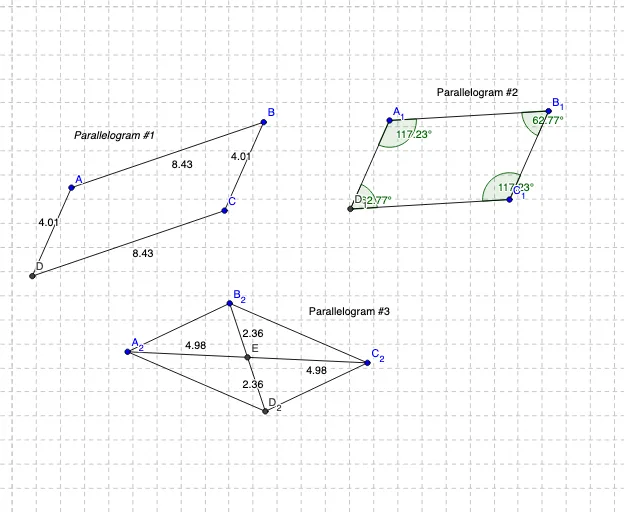
This example dynamically demonstrates the properties of a parallelogram to help students observe and discover its characteristics. Key mathematical concepts include equal opposite sides, equal opposite angles, and bisecting diagonals. Using GeoGebra commands such as Segment, Line, Intersect, and Angle, students can construct and observe the properties of a parallelogram. Suitable for middle school and above students learning geometric properties.
GeoGebra Commands & Parameters
Segment(A, B) → aLine(C, a) → bSegment(B, C) → cLine(A, c) → dIntersect(b, d) → DSegment(A, D) → eSegment(D, C) → fSegment(A_1, B_1) → a_1Line(C_1, a_1) → b_1Segment(B_1, C_1) → c_1Line(A_1, c_1) → d_1Intersect(b_1, d_1) → D_1Segment(A_1, D_1) → e_1Segment(D_1, C_1) → f_1Angle(B_1, A_1, D_1) → αAngle(D_1, C_1, B_1) → βAngle(A_1, B_1, C_1) → γAngle(C_1, D_1, A_1) → δSegment(A_2, B_2) → a_2Line(C_2, a_2) → b_2Segment(B_2, C_2) → c_2Line(A_2, c_2) → d_2Intersect(b_2, d_2) → D_2Segment(A_2, D_2) → e_2Segment(D_2, C_2) → f_2Segment(B_2, D_2) → gSegment(A_2, C_2) → hIntersect(g, h) → ESegment(E, B_2) → iSegment(E, D_2) → jSegment(E, C_2) → kSegment(E, A_2) → l
AI Drawing Prompt Reference
Draw a parallelogram by first creating a base segment and a side segment, then drawing a line through the side's endpoint parallel to the base, and another line through the base's endpoint parallel to the side, intersecting to form the fourth vertex. Connect to complete the shape. Duplicate this parallelogram and label its four interior angles, showing opposite angles are equal. Duplicate again, draw both diagonals, mark their intersection, and show segments from this point to each vertex to illustrate that diagonals bisect each other.
The prompt above was compiled from the original drawing commands and is for reference only.