
The Coordinate Plane (Cartesian Plane)
Loading the math board and drawing, please wait…
In collections
Coordinate Geometry
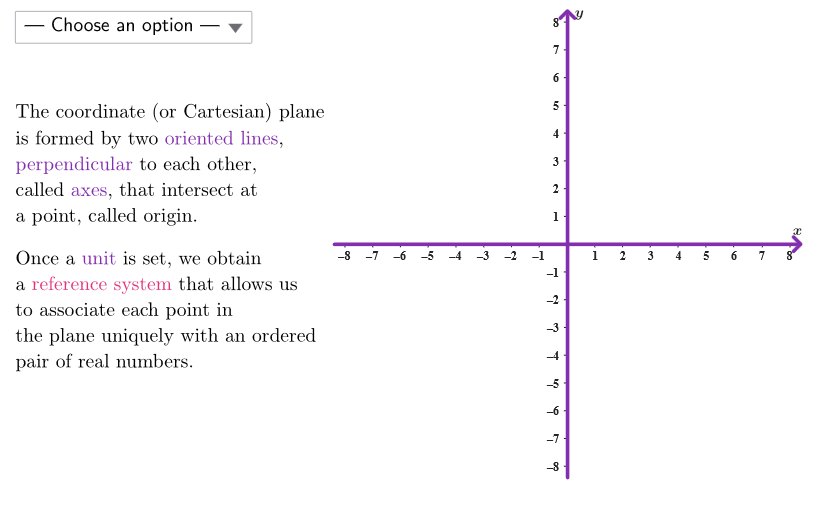
The coordinate plane is a fundamental concept in mathematics used to describe points and graphs in two-dimensional space. This example explores the main definitions of the coordinate plane, complemented by scaffolding activities and assessment of knowledge and skills. Through this example, students can gain a deeper understanding of the basic concepts of the coordinate plane, including coordinate axes, coordinate points, and the distance formula. The example uses GeoGebra to construct an interactive graph that allows students to explore various aspects of the coordinate plane. Suitable for middle school and high school mathematics courses, particularly geometry and coordinate geometry.
GeoGebra Commands & Parameters
Shuffle({1, 2, 3}) → allCaseNum, {1, 3, 2}Element(allCaseNum, Mod[countQuestion, Length[allCaseNum]] + 1) → caseNumPolygon({GRMIN + ((-offX), (-offY)), (x(GRMAX), y(GRMIN)) + (offX, (-offY)), GRMAX + (offX, offY), (x(GRMIN), y(GRMAX)) + ((-offX), offY)}) → peepSelectedIndex(ddMenu) → isSequence((k, 0), k, -10, 10, 1) → xGridSequence((0, k), k, 1, 16, 1) → yGridPointIn(peep) → ONBPTcirclePixels(ONBPT, 7 + (7 * pulsing), (xMin, yMin), (xMax, yMax), (PXwidth, PXheight)) → pulsingObjectSegment((x(GRMIN) - offX, 0), (x(GRMAX) + offX, 0)) → fakeXSegment((0, y(GRMIN) - offY), (0, y(GRMAX) + offY)) → fakeYJoin(Sequence[Sequence[(j, k), j, x(GRMIN), x(GRMAX), 1], k, y(GRMIN), y(GRMAX), 1]) → bigGridPolygon({O, (x(GRMAX) + offX, 0), GRMAX + (offX, offY), (0, y(GRMAX) + offY)}) → quad1Mirror(quad1, x = 0) → quad2Mirror(quad2, y = 0) → quad3Mirror(quad3, x = 0) → quad4Segment((x(GRMIN) - offX, 0), (x(GRMAX) + offX, 0)) → fakeX2Segment((0, y(GRMIN) - offY), (0, y(GRMAX) + offY)) → fakeY2Point(bigGrid) → PSegment(P, PX) → projXSegment(P, PY) → projYSegment(O, PX) → ascSegment(O, PY) → ordIf(x(P) > 0 ∧ y(P) > 0, "in quadrant I", x(P) ≟ 0 ∧ y(P) ≠ 0, "on the \(y-\)axis", "on the \(x-\)axis", x(P) > 0 ∧ y(P) < 0, "in quadrant IV", x(P) < 0 ∧ y(P) > 0, "in quadrant II", x(P) < 0 ∧ y(P) < 0, "in quadrant III", x(P) ≟ 0 ∧ y(P) ≟ 0, "at the origin") → textQuadrNumIf(x(P) > 0, "positive", x(P) < 0, "negative", "zero") → textSegnXIf(y(P) > 0, "positive", y(P) < 0, "negative", "zero") → textSegnYIf(x(P) > 0, ">0", x(P) < 0, "<0", "=0") → textVersXIf(y(P) > 0, ">0", y(P) < 0, "<0", "=0") → textVersY
AI Drawing Prompt Reference
Draw a Cartesian coordinate plane with a grid, axes extending from -10 to 10, and the origin marked. Shade the four quadrants with semi-transparent colors: first quadrant upper right, second upper left, third lower left, fourth lower right. Place a random point on the grid, draw perpendicular dashed segments from it to both axes, and mark the foot points. Display the signs of its x and y coordinates (positive, negative, or zero) and a text label indicating which quadrant or axis it lies on. Extend the axes slightly beyond the grid.
The prompt above was compiled from the original drawing commands and is for reference only.