
Rhombus Measurement: Side Lengths, Diagonals, Angles, and Area Visualization
Loading the math board and drawing, please wait…
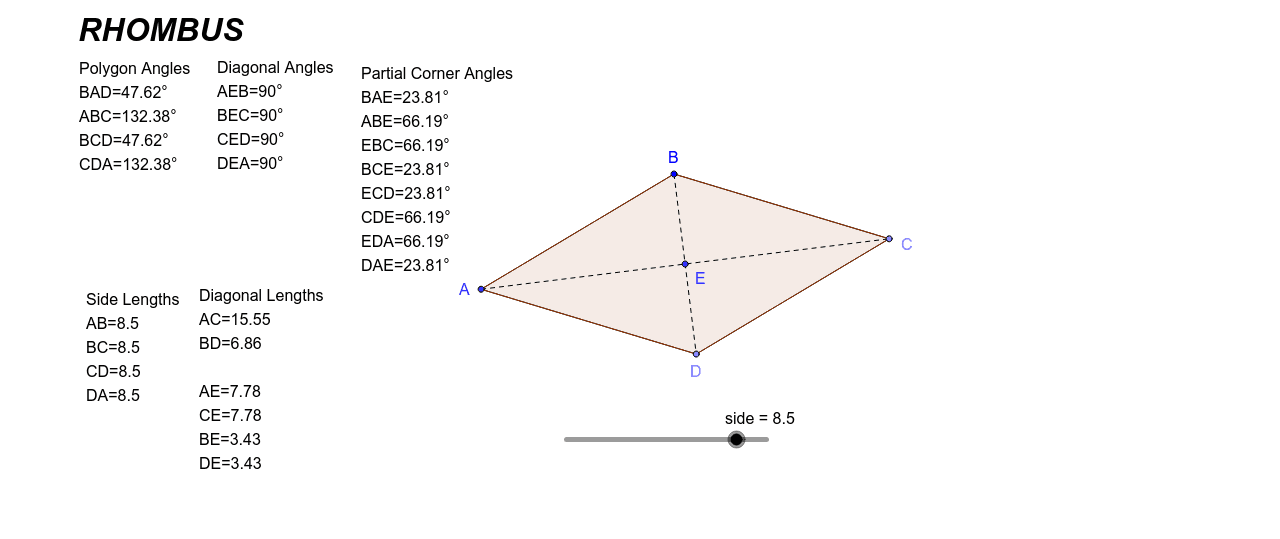
This GeoGebra example provides a comprehensive measurement exploration of a rhombus, displaying all four side lengths, both diagonal lengths, four interior angles, and area-related data derived from the diagonal-split triangles. The core mathematical concepts include the defining property of a rhombus (all sides equal), perpendicular bisecting diagonals, equal opposite angles, supplementary adjacent angles, and the use of the Pythagorean theorem and trigonometric ratios to relate side lengths and angles. The construction employs GeoGebra commands such as Point, Segment, Circle, Intersect, Distance, Angle, and Polygon to build the rhombus and its circumcircle, measure distances, label angles, and form internal triangles for area analysis. This resource is suitable for middle school to high school students, aiding in the understanding of rhombus properties, geometric measurement techniques, and the application of dynamic geometry software for mathematical inquiry. It can serve as a classroom demonstration tool or a self-guided exploration activity.
GeoGebra Commands & Parameters
Point(Circle[B, abs(side)]) → CSegment(B, C) → aPoint(Circle[C, abs(side)]) → DSegment(C, D) → bCircle(B, side) → cCircle(D, side) → dIntersect(c, d, 2) → ASegment(B, A) → eSegment(A, D) → fSegment(A, C) → gSegment(B, D) → hIntersect(h, g) → EDistance(A, B) → distanceABDistance(B, C) → distanceBCDistance(C, D) → distanceCDDistance(D, A) → distanceDADistance(A, C) → distanceACDistance(B, D) → distanceBDDistance(A, E) → distanceAEDistance(C, E) → distanceCEDistance(B, E) → distanceBEDistance(D, E) → distanceDEAngle(D, A, B) → αAngle(A, B, C) → βAngle(B, C, D) → γAngle(C, D, A) → δAngle(B, E, A) → εAngle(C, E, B) → ζAngle(D, E, C) → ηAngle(A, E, D) → θAngle(E, A, B) → ιAngle(A, B, E) → κAngle(E, B, C) → λAngle(B, C, E) → μAngle(E, C, D) → νAngle(C, D, E) → ξAngle(E, D, A) → οAngle(D, A, E) → ρPolygon(A, B, C, D) → poly1, a_1, b_1, c_1, d_1
AI Drawing Prompt Reference
Draw a rhombus, displaying all four side lengths, both diagonal lengths, four interior angles, and area data. First, construct the rhombus and its circumcircle. Measure and label the lengths of the four sides and two diagonals. Calculate and label the four interior angles. Split the rhombus into four right-angled triangles using the diagonals, calculate and label the area of each triangle, and thus the total area of the rhombus. Show properties like diagonals bisecting each other at right angles, opposite sides being parallel, adjacent angles being supplementary, and apply the Pythagorean theorem and trigonometric ratios.
The prompt above was compiled from the original drawing commands and is for reference only.