
Kite Measurements: Geometry and Probability
Loading the math board and drawing, please wait…
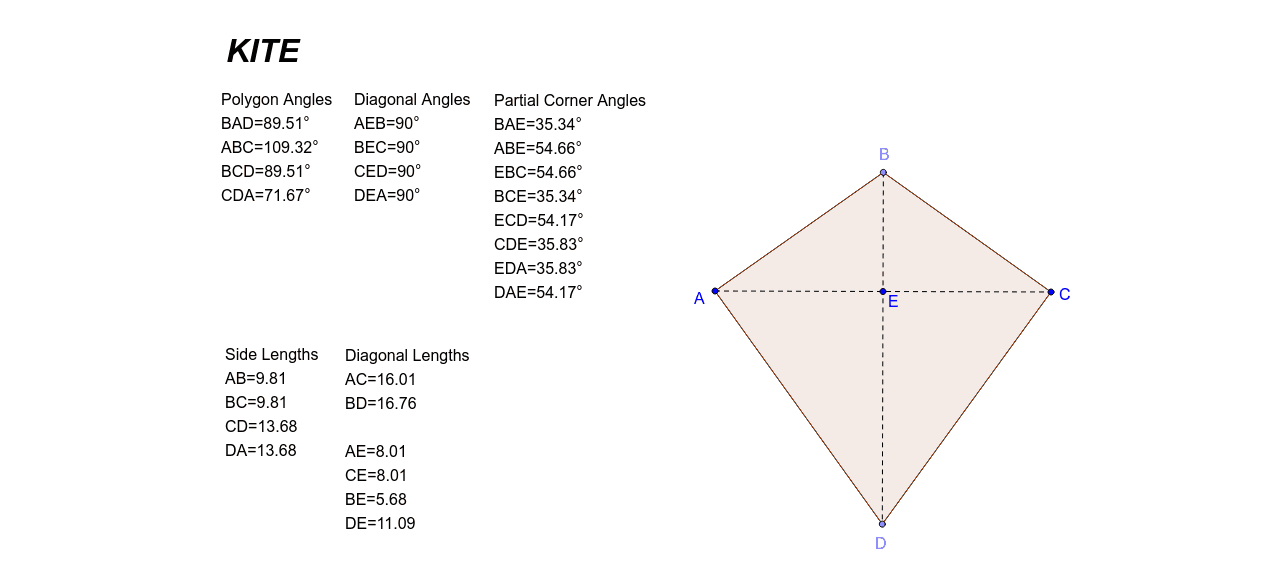
This example demonstrates the connection between geometric shapes and probability statistics using kite measurements. Key mathematical concepts include rational numbers, expected value, and polygon properties. Construction involves GeoGebra commands like Segment, LineBisector, and Polygon to build the kite shape, calculating distances and angles. Suitable for middle school students learning geometric construction and basic probability calculations, useful as a teaching aid.
GeoGebra Commands & Parameters
Segment(A, C) → aLineBisector(A, C) → bPoint(b) → BPoint(b) → DSegment(A, B) → cSegment(B, C) → dSegment(A, D) → eSegment(C, D) → fSegment(B, D) → gSegment(A, C) → hIntersect(g, h) → EDistance(A, B) → distanceABDistance(B, C) → distanceBCDistance(C, D) → distanceCDDistance(D, A) → distanceDADistance(A, C) → distanceACDistance(B, A) → distanceBADistance(A, E) → distanceAEDistance(C, E) → distanceCEDistance(B, E) → distanceBEDistance(D, E) → distanceDEDistance(B, D) → distanceBDAngle(D, A, B) → αAngle(A, B, C) → βAngle(B, C, D) → γAngle(C, D, A) → δAngle(E, A, B) → εAngle(A, B, E) → ζAngle(E, B, C) → ηAngle(B, C, E) → θAngle(E, C, D) → ιAngle(C, D, E) → κAngle(E, D, A) → λAngle(D, A, E) → μAngle(B, E, A) → νAngle(C, E, B) → ξAngle(D, E, C) → οAngle(A, E, D) → ρPolygon(A, B, C, D) → poly1, a_1, b_1, c_1, d_1
AI Drawing Prompt Reference
Draw a kite ABCD with points A, B, C, and D as vertices. First, connect A and C, then draw the perpendicular bisector of AC to locate points B and D. Next, connect AB, BC, CD, and DA to form the kite. Measure the lengths of AB, BC, CD, DA, AC, and BD, as well as the angles ∠A, ∠B, ∠C, ∠D, and ∠E.
The prompt above was compiled from the original drawing commands and is for reference only.