
Regulated Surfaces via Straight-Line Rulings and Transformations
Loading the math board and drawing, please wait…
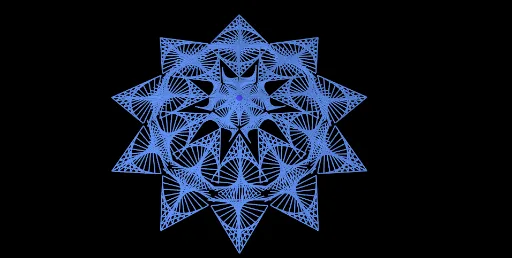
This example demonstrates how to visualize a regulated surface by constructing it from a family of straight-line rulings (piecewise lines) connecting points on two boundary curves/segments, and how geometric relationships and intersections emerge under controlled boundary conditions. The key mathematics includes the definition of a regulated surface (built from straight lines joining corresponding points), midpoint and mirror constructions, and similarity transformations such as translation, rotation, and dilation. Construction focuses on GeoGebra commands Midpoint (for derived control points), Mirror (to reflect key geometry), Sequence (to create a parameter sampling for ruling endpoints), Translate (to shift configurations), Dilate (to scale with similarity), Rotate (to orient shapes), Line (to create boundary lines and the ruling lines themselves), and Point (to define control and endpoint geometry). The named objects (e.g., control points like A, B, C, D and their primed versions; multiple line sets such as l1…l15, l8', l8''; and auxiliary constructs like sequences indexed by n) are orchestrated to produce the surface structure and its intersection behavior. Suitable for advanced high-school students and undergraduate geometry visualization, supporting instruction on spatial intuition, geometric construction, and transformation-based modeling.
GeoGebra Commands & Parameters
Midpoint(A, B) → CMidpoint(C, B) → EMirror(D, E) → D'Sequence(Translate[A, Vector[(i * Vector[A, D'])]], i, 0, 1, 1 / n) → l1Sequence(Translate[A, Vector[(i * Vector[A, D])]], i, 0, 1, 1 / n) → l2Sequence(Translate[D, Vector[(i * Vector[D, B])]], i, 0, 1, 1 / n) → l3Sequence(Translate[B, Vector[(i * Vector[B, D'])]], i, 0, 1, 1 / n) → l4Sequence(Segment[Element[l1, i], Element[l2, Length[l2] - i]], i, 1, Length[l1]) → l5Sequence(Segment[Element[l1, i], Element[l3, Length[l3] - i]], i, 1, Length[l1]) → l6Sequence(Segment[Element[l2, i], Element[l4, i]], i, 1, Length[l1]) → l7Translate(Dilate[l8, b, A], Vector[A, B]) → l8'Dilate(B, b, A) → B'Rotate(Dilate[l8, b / 1.5, A], (-(45°)), B + (2, -1)) → l8'_{1}Sequence(Translate[D, Vector[(i * Vector[D, D + (3, 0.15)])]], i, 0, 1, 1 / n) → l3bSequence(Segment[Element[l3, i], Element[l3b, Length[l3] - i]], i, 1, Length[l3]) → l11Sequence(Translate[D', Vector[(i * Vector[D', D' + (3, -0.15)])]], i, 0, 1, 1 / n) → l4bSequence(Segment[Element[l4, i], Element[l4b, i]], i, 1, Length[l3]) → l12Mirror(B - (((-b)) / 2, 0), B') → B'_{1}Mirror(l8', B'_{1} - (b / 2, 0)) → l8''Translate(Dilate[l3, b, A], Vector[A, B]) → l3cTranslate(Dilate[l4, b, A], Vector[A, B]) → l4cTranslate(Dilate[l1, b, A], Vector[A, B]) → l1cTranslate(Dilate[l2, b, A], Vector[A, B]) → l2cMirror(l1c, B'_{1} - (1, 0)) → l1c'Midpoint(B', B'_{1}) → FLine(A, zAxis) → fSequence(Rotate[l8, i, f], i, 0, (2 * π), (2 * π / m)) → l9Sequence(Rotate[l8', i, f], i, 0, (2 * π), π / m) → l10Sequence(Rotate[l11, i, f], i, 0, (2 * π), (2 * π / m)) → l13Sequence(Rotate[l12, i, f], i, 0, (2 * π), (2 * π / m)) → l14Sequence(Rotate[l8'', i, f], i, 0, (2 * π), π / m) → l15Sequence(Rotate[F, i, f], i, 0, (2 * π), (2 * π / m)) → l16Point(l15) → GPoint(l15) → HPoint(l15) → I
AI Drawing Prompt Reference
Draw a ruled surface built from families of straight lines. Start with four control points, construct midpoints, and reflect a point to create symmetry. Generate points along two boundary segments at equal intervals, then connect corresponding points to form three sets of line families. Transform one line family by translation, scaling, and rotation, then mirror it. Rotate several line families around a vertical axis to create multiple radial sets, forming a three-dimensional surface. Finally, place three points on the rotated lines as markers. The result is a complex geometric structure of intersecting, rotated, and mirrored lines.
The prompt above was compiled from the original drawing commands and is for reference only.