
Regular Prism
Loading the math board and drawing, please wait…
In collections
The GeoGebra's Toolbox for Teachers and Students
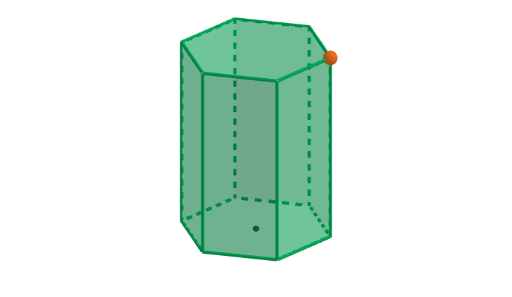
This interactive example demonstrates a regular prism, involving concepts of prisms and solid geometry. Using GeoGebra commands such as Sequence, Polygon, and Circle, it dynamically shows the construction process of a prism. Suitable for middle school and above students or teachers.
GeoGebra Commands & Parameters
Sequence(Rotate[K + (r, 0), ((k * 2) * pi / n), K], k, 0, n) → verticesPolygon(vertices) → poli1Circle(K, r) → eSequence(Segment[Element[vertices, k], Element[vertices, k + 1]], k, 1, n) → sidesSegment((2, 0, 0), (2, 0, 7)) → hPoint(h) → PPrism(poli1, P) → a, A, face3, face4, face2, face5, face6, face7, face8, face9, faceABCP, edge1, B, edge2, edge3, edge4, edge5, edge7, edge9, edge11, edge13, edgeAP, edgeAB, C, edgeBC, edgeCP, edge6, edge8, edge10, edge12, edge14, D, E, F, G, H, face1
AI Drawing Prompt Reference
Draw a 3D regular n-gonal prism. First construct the base as a regular n-sided polygon in a plane, then define the height using a vertical segment and take the segment’s endpoint as the top point. From that point, build the top face corresponding to the base polygon and connect each consecutive pair of base vertices to the matching top vertices to form the lateral edges and faces. Include the base face, the top face, and the visible prism edges/faces, showing the prism’s structure consistently from the base center reference.
The prompt above was compiled from the original drawing commands and is for reference only.