
Regular Polyhedra – Two Projections: Monge and Axonometric
Loading the math board and drawing, please wait…
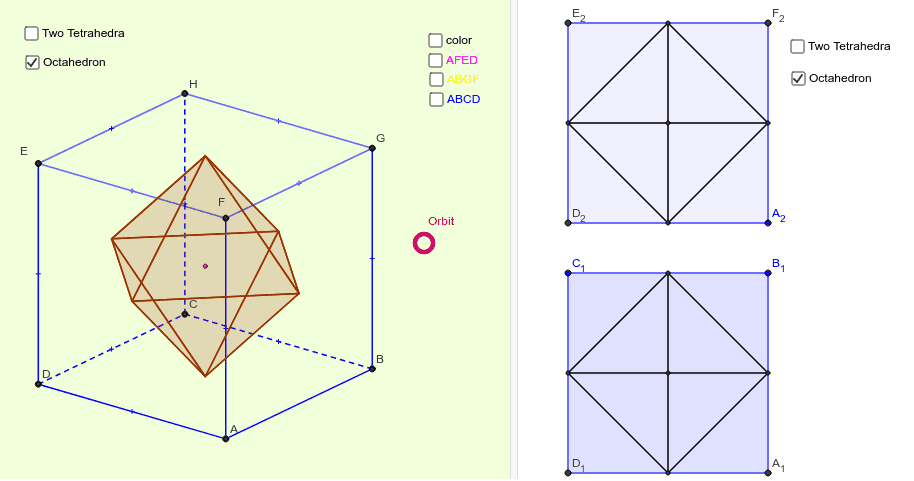
① This example shows the cube and its dual regular polyhedra rendered in both Monge (orthographic) and axonometric (oblique) projections. ② Core concepts include solid geometry of regular polyhedra, dual polyhedra, and projection transformations (Monge and axonometric). ③ Construction highlights: the model is built with GeoGebra commands Translate, Mirror, Midpoint, Polygon, Intersect, and Segment, using base objects i, j, T, e1‑e4, h, OO and their transformed copies OO', OO'', etc. ④ Suitable for high‑school solid geometry lessons, university geometry courses, and anyone interested in geometric modeling.
GeoGebra Commands & Parameters
Translate(OO, e1) → OO'_1Translate(OO, e2) → OO'_2Translate(OO, e3) → OO'_3Translate(OO, e4) → OO'_4Translate(OO, h) → OO'_5Mirror(OO'_5, OO) → OO''_1Midpoint(OO'_2, OO'_1) → A_3Mirror(OO, A_3) → OO'_6Mirror(OO'_6, OO'_2) → OO''_2Mirror(OO'_6, OO'_1) → OO''_3Mirror(OO''_3, OO'_4) → OO'''_1Midpoint(OO'_5, OO'_2) → B_2Mirror(OO, B_2) → OO'_7Mirror(OO'_7, OO'_5) → OO''_4Mirror(OO'_7, OO) → OO''_5Mirror(OO''_4, OO) → C_2Midpoint(OO'_5, OO'_1) → D_3Mirror(OO, D_3) → OO'Mirror(OO', OO'_5) → OO''_6Mirror(OO', OO) → OO''Mirror(OO'', OO''_1) → OO'''Midpoint(C_2, OO'') → E_1Mirror(OO''_1, E_1) → BMirror(B, OO'') → CMirror(C, OO''_5) → DMirror(D, OO''') → AMirror(A, OO'_6) → FMirror(F, OO'_7) → GMirror(G, OO''_6) → HMirror(H, OO''_4) → EPolygon(E, H, G, F) → многоугольник1, h''', h'', h', h_1Polygon(B, C, D, A) → многоугольник2, f, f', f'', f'''Polygon(G, H, C, B) → многоугольник3, h'_1, h''_1, f'_1, f_1Polygon(F, G, B, A) → многоугольник4, h_2, h'_2, f_2, f'''_1Polygon(E, F, A, D) → многоугольник5, h'''_1, h_3, f'''_2, f''_1Polygon(C, H, E, D) → многоугольник6, f'_2, h''_2, h'''_2, f''_2Midpoint(G, C) → F_1Polygon(C, H, E, D, A, F, G, B) → многоугольник7, c_1, c1, d1, d_1, a_1, a1, b1, b_1Polygon(D, A, F, E) → многоугольник8, d, a_2, a1_1, d1_1Polygon(E, F, A, D) → многоугольник9, d1_2, a1_2, a_3, d_2Polygon(F, G, B, A) → многоугольник10, a1_3, b1_1, b_2, a_4Polygon(F, G, B, A) → многоугольник11, a1_4, b1_2, b_3, a_5Polygon(B, A, D, C) → многоугольник12, b_4, a_6, d_3, c_2Polygon(B, C, D, A) → многоугольник13, b_5, c_3, d_4, a_7Intersect(yAxis, xAxis) → D_2Polygon(D_2, A_2, 4) → mnohoúhelník1, d_5, a_8, g, k, F_2, E_2Polygon(B_1, C_1, 4) → mnohoúhelník2, a_9, d_6, l, m, D_1, A_1Midpoint(E_2, A_2) → IMidpoint(C_1, A_1) → JMidpoint(k) → KMidpoint(a_8) → LMidpoint(g) → MMidpoint(d_5) → NMidpoint(a_9) → OMidpoint(d_6) → PMidpoint(m) → QMidpoint(l) → RPolygon(OO'_5, OO'_4, OO'_1) → mnohoúhelník3, oo'_1, oo'_5, oo'_4Intersect(oo'_4, oo'_1) → SIntersect(oo'_4, oo'_5) → UPolygon(S, U, OO'_2) → mnohoúhelník4, oo'_2, s, uIntersect(oo'_5, oo'_1) → VPolygon(V, OO''_1, U) → mnohoúhelník5, u_1, v, oo''_1Intersect(u, s) → WIntersect(v, u_1) → ZPolygon(U, W, Z) → mnohoúhelník6, z, u_2, wPolygon(S, OO'_3, V) → mnohoúhelník7, v_1, s_1, oo'_3Intersect(s_1, v_1) → G_1Polygon(G_1, Z, W) → mnohoúhelník8, w_1, g_1, z_1Polygon(V, G_1, Z) → mnohoúhelník9, z_2, v_2, g_2Polygon(S, G, W) → mnohoúhelník18, w_2, s_2, g_3Polygon(S, E, V) → mnohoúhelník19, v_3, s_3, e_1Intersect(s_3, v_3) → H_1Polygon(H_1, V, U) → mnohoúhelník20, u_3, h_4, v_4Polygon(U, S, H_1) → mnohoúhelník21, h_5, u_4, s_4Polygon(U, Z, A) → mnohoúhelník22, a_{10}, u_5, z_3Intersect(z_3, u_5) → I_1Polygon(Z, W, I_1) → mnohoúhelník23, i_5, z_4, w_3Polygon(U, W, I_1) → mnohoúhelník24, i_6, u_6, w_4Polygon(C, V, Z) → mnohoúhelník25, z_5, c_4, v_5Intersect(v_5, z_5) → J_1Polygon(V, G_1, J_1) → mnohoúhelník26, j_5, v_6, g_4Polygon(G_1, Z, J_1) → mnohoúhelník27, j_6, g_5, z_6Intersect(s_2, w_2) → K_1Polygon(S, K_1, G_1) → mnohoúhelník28, g_6, s_5, k_3Polygon(K_1, G_1, W) → mnohoúhelník29, w_5, k_4, g_7Polygon(W, G_1, B) → mnohoúhelník30, b_6, w_6, g_8Intersect(g_8, w_6) → L_1Polygon(Z, G_1, L_1) → mnohoúhelník31, l_3, z_7, g_9Polygon(W, Z, L_1) → mnohoúhelník32, l_4, w_7, z_8Polygon(D, V, Z) → mnohoúhelník33, z_9, d_7, v_7Intersect(v_7, z_9) → M_1Polygon(U, V, M_1) → mnohoúhelník34, m_3, u_7, v_8Polygon(U, Z, M_1) → mnohoúhelník35, m_4, u_8, z_{10}Polygon(H, V, S) → mnohoúhelník39, s_8, h_6, v_9Intersect(v_9, s_8) → O_1Polygon(O_1, S, G_1) → mnohoúhelník40, g_{10}, o_2, s_9Polygon(O_1, V, G_1) → mnohoúhelník41, g_{11}, o_3, v_{10}Polygon(F, U, S) → mnohoúhelník42, s_{10}, f_3, u_{11}Intersect(u_{11}, s_{10}) → P_1Polygon(P_1, S, W) → mnohoúhelník44, w_{11}, p_3, s_{11}Segment(E_2, A_2) → t_1Segment(F_2, D_2) → t_2Segment(C_1, A_1) → t_3Segment(D_1, B_1) → t_4Segment(M, I) → nSegment(I, N) → pSegment(K, I) → qSegment(I, L) → rSegment(M, L) → i_1Segment(L, N) → j_1Segment(N, K) → k_1Segment(K, M) → l_1Segment(O, P) → m_1Segment(P, R) → n_1Segment(R, Q) → p_1Segment(Q, O) → q_1Segment(O, J) → r_1Segment(J, P) → i_2Segment(J, R) → j_2Segment(J, Q) → k_2Polygon(S, W, G_1) → mnohoúhelník10, g_{12}, s_6, w_8
AI Drawing Prompt Reference
Draw a cube and its dual polyhedron with two projections: orthographic and oblique. Start by drawing the six faces of the cube, then use mirroring and translation to create the dual polyhedron. Next, draw the orthographic and oblique projections separately. Finally, connect key points to form polygons, showcasing the structure of the cube and its dual.
The prompt above was compiled from the original drawing commands and is for reference only.