
Reflection about z=y
Loading the math board and drawing, please wait…
In collections
Reflecting about Planes
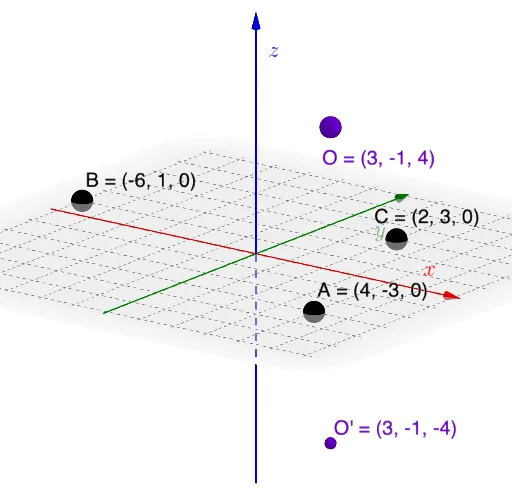
This example demonstrates the reflection transformation about the plane z=y. Core mathematical concepts include reflection, coordinate geometry, and geometric transformations. Construction highlights the use of GeoGebra commands: Plane, Mirror, Line, Intersect, OrthogonalLine, Dilate, Segment, Point, Rotate, Angle; objects include SlideMe, O, C, B, A, p, O', f, D, j, q, O'_{1}, g, D', h, i, E, O'_{2}, F, g', planefilling, G, α. Suitable for high school and above students to learn and understand the properties of geometric transformations.
GeoGebra Commands & Parameters
Plane(A, B, C) → pMirror(O, p) → O'Line(O, O') → fIntersect(p, f) → DOrthogonalLine(D, Vector[D, O], Vector[D, B]) → jPlane(f, j) → qDilate(O, If[0 < SlideMe ≤ 1, 1 - SlideMe, 0], D) → O'_{1}Segment(O, O'_{1}) → gDilate(D, If[1 < SlideMe ≤ 2, 2 - SlideMe, 0], O') → D'Segment(D, D') → hOrthogonalLine(D, Vector[O, O'], xOyPlane) → iPoint(i) → ERotate(O, If[2 < SlideMe ≤ 3, ((SlideMe - 2) * π), π], D, q) → O'_{2}Rotate(O'_{1}, If[2 < SlideMe ≤ 3, ((SlideMe - 2) * π), π], D, q) → FSegment(O'_{2}, F) → g'Point(j) → GAngle(G, D, O) → α
AI Drawing Prompt Reference
Create a reflection figure about the plane z=y. Start by creating points O, A, B, and C, then construct plane p. Mirror point O to get O', and construct line f. The intersection of plane p and line f is point D. Through D, construct line j, and then construct plane q. Adjust points O'1 and O'2 using the slider SlideMe to construct segments g and g'. Rotate points O and O'1 to get point F. Finally, construct point G and angle α.
The prompt above was compiled from the original drawing commands and is for reference only.