
Rectangular Prisms - Surface Area and Volume
Loading the math board and drawing, please wait…
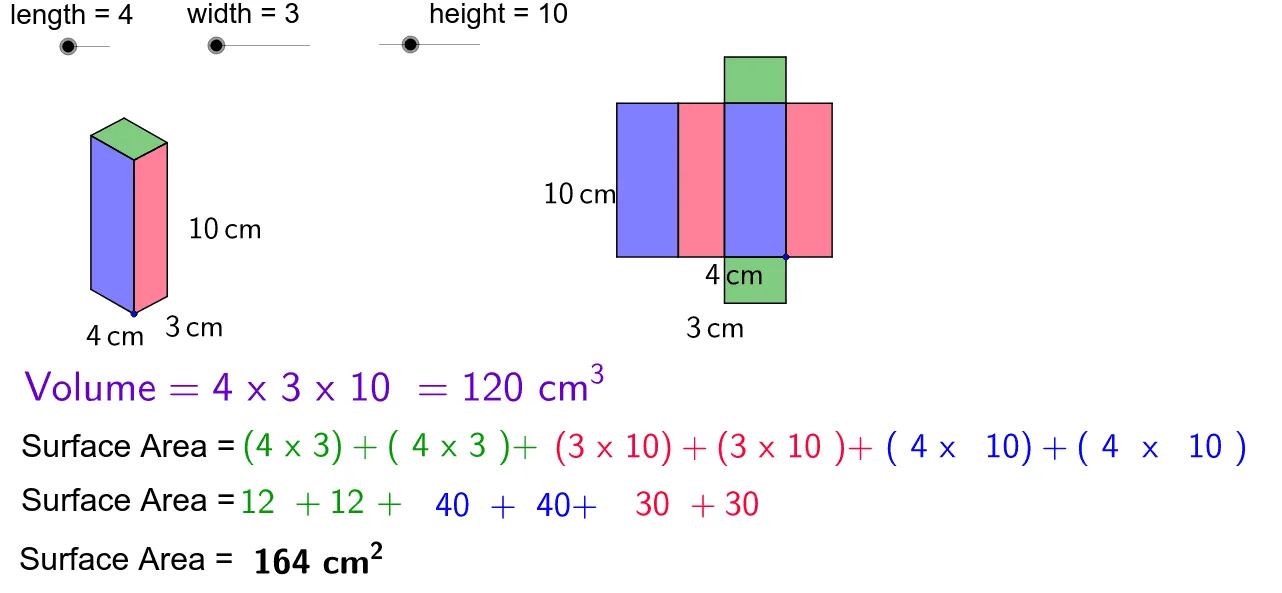
This example demonstrates how to construct a rectangular prism using GeoGebra and calculate its surface area and volume. Key math concepts include prism geometry, surface area formulas, volume formulas, and vector operations. Construction highlights involve commands like Vector, Translate, Polygon, Line, Intersect, and Midpoint. Suitable for middle school students and above learning solid geometry and spatial reasoning skills.
GeoGebra Commands & Parameters
Vector(A, B) → uVector(A, C) → vVector(A, D) → wTranslate(E, Vector[(height * u)]) → E'Vector(E, E') → zTranslate(E, Vector[(width * w)]) → E'_1Translate(E, Vector[(length * v)]) → E'_2Translate(E'_2, Vector[(height * u)]) → FTranslate(E'_1, Vector[(height * u)]) → GPolygon(F, E'_2, E, E') → poly1, f, e'_2, e, e'Polygon(E, E'_1, G, E') → poly2, e_1, e'_1, g, e'_3Line(F, g) → dLine(G, e') → hIntersect(d, h) → HPolygon(F, E', G, H) → poly3, f_1, e'_4, g_1, h_1Polygon(J, I, K, L) → poly4, j, i, k, lPolygon(N, J, I, M) → poly5, n, j_1, i_1, mPolygon(N, P, O, M) → poly6, n_1, p, o, m_1Polygon(Q, R, N, J) → poly7, q, r, n_2, j_2Polygon(T, S, I, M) → poly8, t, s, i_2, m_2Polygon(V, U, O, P) → poly9, v_1, u_1, o_1, p_1Midpoint(e'_2) → WMidpoint(e_1) → ZMidpoint(e'_1) → A_1Midpoint(v_1) → B_1Midpoint(u_1) → C_1Midpoint(o) → D_1Midpoint(m_2) → E_1Midpoint(t) → F_1
AI Drawing Prompt Reference
Construct a rectangular prism by first defining three adjacent vertices on the base, then generating three edge vectors from them. Use these vectors to translate the remaining vertices. Connect vertices with polygons to form six faces, where three faces are built via translation and intersection, and the other three are directly connected from known points. Mark the midpoint of each face for later calculations. The final figure shows a clear 3D prism with all vertices, edges, and faces, emphasizing the center points of each face.
The prompt above was compiled from the original drawing commands and is for reference only.