
Cylinder Surface Area and Volume
Loading the math board and drawing, please wait…
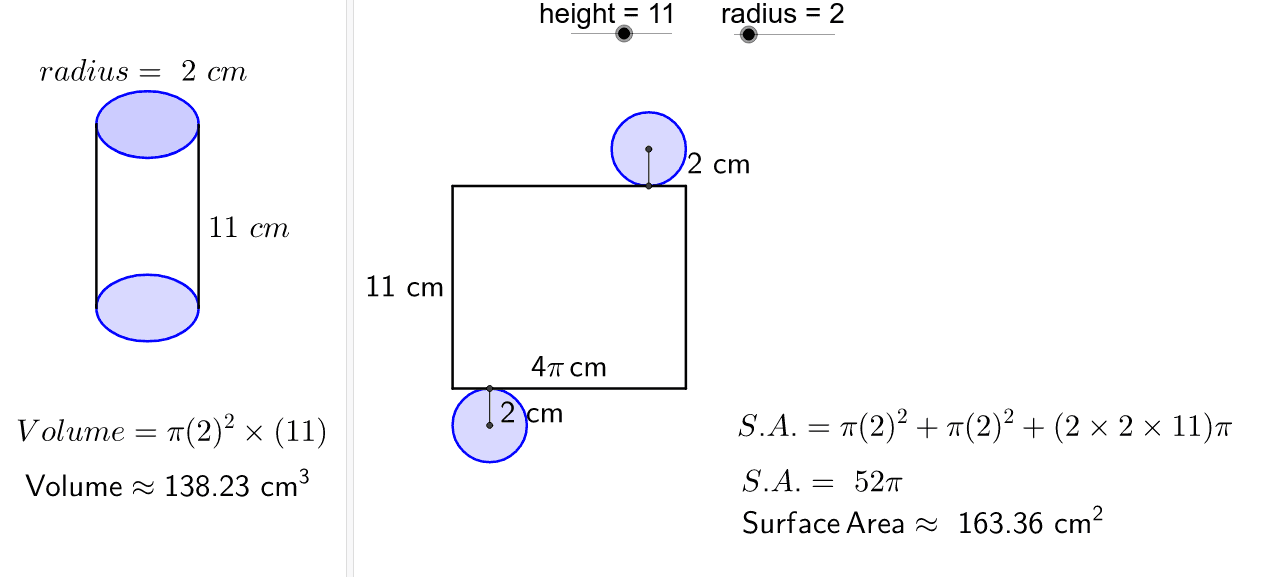
This example demonstrates the calculation of surface area and volume for a cylinder. It involves core mathematical concepts such as the area of a circle, lateral surface area of a cylinder, volume formulas, and spatial geometry. Construction uses commands like Point, Circle, Segment, Intersect, OrthogonalLine, Line, defining objects like radius and height. Suitable for high school mathematics teaching and geometric learning to help understand cylinder calculation formulas.
GeoGebra Commands & Parameters
Point(xAxis) → ACircle(A, radius) → cSegment(B, C) → aCircle(E, radius) → dSegment(C, E) → bSegment(E, D) → eSegment(D, B) → fIntersect(d, b, 1) → FCircle(F, radius) → gOrthogonalLine(F, b) → hIntersect(g, h, 2) → GCircle(G, radius) → kIntersect(c, xAxis, 2) → HCircle(H, radius) → pIntersect(p, f, 1) → IPoint(yAxis) → JCircle(J, radius) → qCircle(K, radius) → rPoint(r) → LPoint(q) → MSegment(L, M) → iLine(K, L) → jLine(J, M) → lIntersect(r, j, 2) → NIntersect(q, l, 2) → OSegment(N, O) → mSegment(I, H) → nSegment(G, F) → t
AI Drawing Prompt Reference
Draw a cylinder to demonstrate the calculation of its surface area and volume. Start by sketching the base circle and lateral surface, labeling the radius and height. Then construct the top circle using the intersection of the lateral surface with the base circle, and draw the unfolded lateral surface. Finally, connect key points with line segments to form a complete geometric figure, clearly showing the cylinder's construction and calculation formulas.
The prompt above was compiled from the original drawing commands and is for reference only.