
Rectangular Prism Volume Investigation
Loading the math board and drawing, please wait…
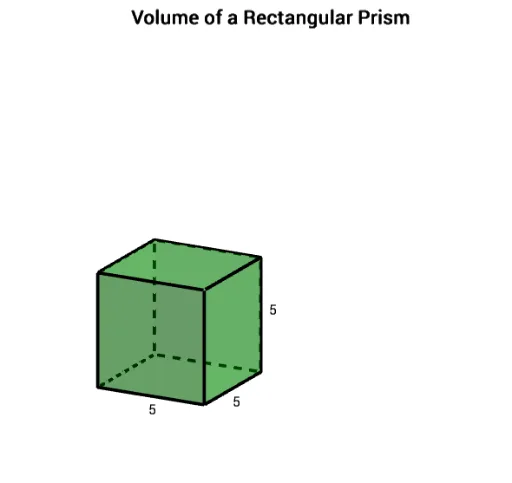
This example demonstrates how to investigate the volume of a rectangular prism interactively. Core math concepts include volume, subtraction, rational numbers, and combinatorics. Construction highlights the use of GeoGebra commands and objects like Intersect, Circle, OrthogonalLine, Sequence, Polygon, Prism, and Segment. Suitable for middle school and above students to understand volume calculations in solid geometry.
GeoGebra Commands & Parameters
Intersect(xAxis, yAxis) → ACircle(A, w_1) → cCircle(A, l_1) → dIntersect(d, xAxis, 2) → BIntersect(c, yAxis, 2) → COrthogonalLine(C, yAxis) → fOrthogonalLine(B, xAxis) → gIntersect(f, g) → DSequence(Segment[A + (i * (1, 0, 0)), C + (i * (1, 0, 0))], i, 1, l_1 - 1) → list1Sequence(Segment[A + (i * (0, 1, 0)), B + (i * (0, 1, 0))], i, 1, w_1 - 1) → list2Polygon(A, C, D, B) → poly1, a, c_1, d_1, bCircle(A, length) → kCircle(A, width) → pIntersect(k, xAxis, 2) → EIntersect(p, yAxis, 2) → FOrthogonalLine(F, yAxis) → iOrthogonalLine(E, xAxis) → jIntersect(i, j) → GPolygon(A, F, G, E) → poly2, a_1, f_1, g_1, ePrism(poly2, height) → m, H, edgeAH, edgeFI, edgeGJ, edgeEK, edgeHI, edgeIJ, edgeJK, edgeHK, I, J, K, faceAFIH, faceFGJI, faceEGJK, faceAEKH, faceHIJKPrism(poly1, h_1) → n, L, edgeAL, edgeCM, edgeDN, edgeBO, edgeLM, edgeMN, edgeNO, edgeLO, M, N, O, faceACML, faceCDNM, faceBDNO, faceABOL, faceLMNOSequence(Segment[A + (i * (1, 0, 0)), L + (i * (1, 0, 0))], i, 1, l_1 - 1) → list3Sequence(Segment[C + (i * (1, 0, 0)), M + (i * (1, 0, 0))], i, 1, l_1 - 1) → list4Sequence(Segment[A + (i * (0, 1, 0)), L + (i * (0, 1, 0))], i, 1, w_1 - 1) → list5Sequence(Segment[B + (i * (0, 1, 0)), O + (i * (0, 1, 0))], i, 1, w_1 - 1) → list6Sequence(Segment[L + (i * (1, 0, 0)), M + (i * (1, 0, 0))], i, 1, l_1 - 1) → list7Sequence(Segment[L + (i * (0, 1, 0)), O + (i * (0, 1, 0))], i, 1, w_1 - 1) → list8Sequence(Segment[A + (i * (0, 0, 1)), B + (i * (0, 0, 1))], i, 1, h_1 - 1) → list9Sequence(Segment[A + (i * (0, 0, 1)), C + (i * (0, 0, 1))], i, 1, h_1 - 1) → list10Sequence(Segment[B + (i * (0, 0, 1)), D + (i * (0, 0, 1))], i, 1, h_1 - 1) → list11Sequence(Segment[C + (i * (0, 0, 1)), D + (i * (0, 0, 1))], i, 1, h_1 - 1) → list12Segment(L, H) → lSegment(H, I) → qSegment(I, J) → rSegment(J, G) → sSegment(G, E) → tSegment(E, K) → i_1Segment(L, H) → k_1Segment(F, I) → n_1Segment(H, K) → p_1Segment(K, J) → q_1Segment(F, G) → r_1Segment(E, A) → j_1Segment(F, A) → m_1
AI Drawing Prompt Reference
Draw a rectangular prism, first sketch the bottom and top faces as rectangles, then connect them with vertical edges to form the three-dimensional structure. The bottom and top faces are parallel and equal. Use different colors or line thicknesses to distinguish the faces and edges for a clear view of the volume calculation.
The prompt above was compiled from the original drawing commands and is for reference only.