
Rectangle Properties: Sides, Diagonals, Angles, and Area
Loading the math board and drawing, please wait…
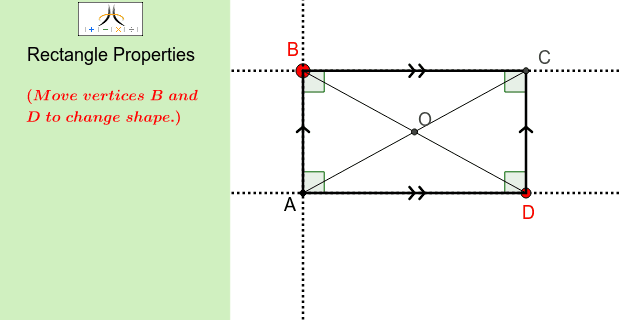
This interactive GeoGebra example dynamically demonstrates the fundamental properties of a rectangle, including opposite sides parallel and equal, all four interior angles being right angles, diagonals equal in length and bisecting each other, and the relationship between side lengths and area. Core mathematical concepts covered are polygons, parallel and perpendicular lines, angles, segment lengths, area calculation, and geometric inequalities. The construction uses GeoGebra commands such as Line, OrthogonalLine, Polygon, PointIn, Point, AngularBisector, Segment, Intersect, Corner, and Angle to build rectangle ABCD, an interior point M, diagonal intersections, angle bisectors, auxiliary segments, and multiple angle markers. Users can drag points or use sliders to resize the rectangle and observe real-time updates of side lengths, angles, and area. Suitable for middle school to high school students learning plane geometry, and useful for teachers demonstrating rectangle properties or for students exploring relationships among rectangles, squares, and rhombi, as well as introductory optimization concepts under linear constraints.
GeoGebra Commands & Parameters
Line(A, D) → lOrthogonalLine(A, l) → bPolygon(J, K, L, M) → poly2, j_1, k_1, l_1, m_1PointIn(poly2) → NPoint(b) → BAngularBisector(B, A, D) → dSegment(D_1, E_1) → eIntersect(e, d) → F_1AngularBisector(D, A, B) → kCorner(1, 1) → Cnr1Corner(1, 2) → Cnr2Corner(1, 3) → Cnr3Corner(1, 4) → Cnr4Polygon(CN1, CN2, CN3, CN4) → Panel, cn1, cn2, cn3, cn4Angle(B, D, A) → γAngle(A, B, D) → εLine(B, l) → aOrthogonalLine(D, l) → cIntersect(a, c) → CSegment(D, C) → mSegment(A, D) → pAngle(C, D, A) → αSegment(A, B) → fSegment(B, C) → gAngle(A, B, C) → βAngle(B, C, D) → δAngle(D, A, B) → ζSegment(A, C) → hSegment(B, D) → iIntersect(h, i) → O
AI Drawing Prompt Reference
Draw a rectangle demonstrating that its opposite sides are parallel and equal, and all four interior angles are right angles. Mark the diagonals, which are equal in length and bisect each other. Add an interior point and draw the angle bisectors. Display all side lengths, angles, and the area, allowing adjustment of the rectangle size via dragging points or sliders for real-time updates.
The prompt above was compiled from the original drawing commands and is for reference only.