
Visualizing the Median in a Right Triangle
Loading the math board and drawing, please wait…
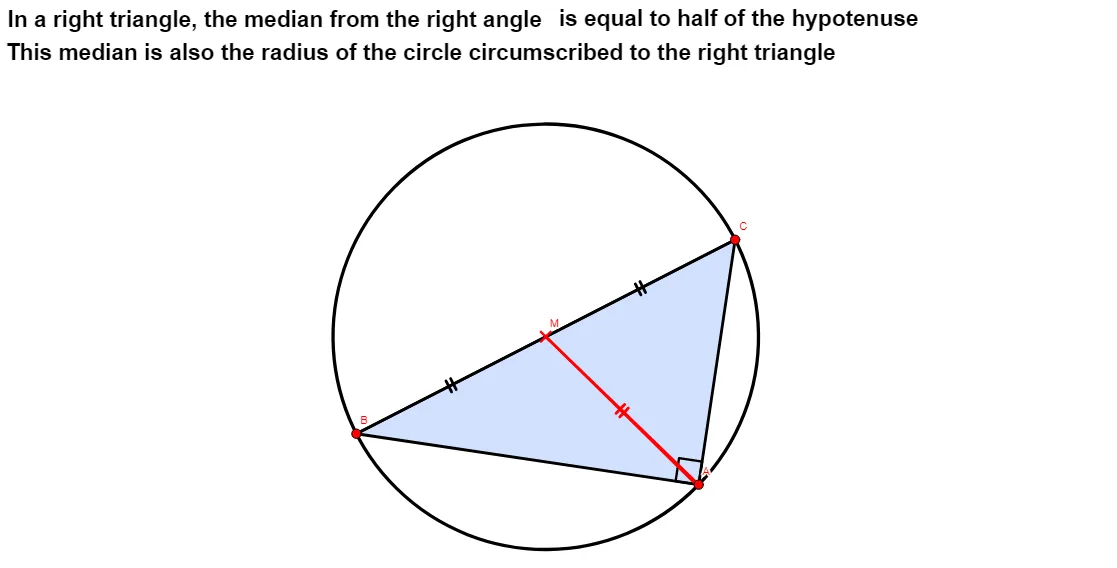
This example demonstrates how to construct the median of a right triangle and visually explore how the median relates to key right-triangle features, including midpoint-based geometry and configurations involving the orthocenter. The main concepts include the median (segment connecting a vertex to the midpoint of the opposite side), midpoint properties, right-triangle geometry, and orthogonal constructions tied to the orthocenter. Construction highlights: it uses Line to draw supporting lines, OrthogonalLine to create perpendicular lines, Point to define key points, and Midpoint to compute the midpoint of a side. Then Segment and Polygon are used to assemble the triangle and the median segment. Angle is employed to mark and track relevant angle relationships. Transformations such as Translate, Rotate, and CircleArc can be used to generate or guide auxiliary elements, while Animation and Speed control the dynamic visualization. Suitable for middle-school geometry practice, interactive classroom demonstrations, and geometry contest preparation focused on constructing and reasoning about triangle medians and orthogonal structures.
GeoGebra Commands & Parameters
Line(B, A) → fOrthogonalLine(A, f) → gPoint(g) → CMidpoint(C, B) → DTranslate(A, Vector[(If[Animation < 5, Animation / 5, 1] * Vector[A, D])]) → MSegment(A, M) → hMidpoint(h) → EPolygon(C, A, B) → t1, a, c, bMidpoint(c) → GAngle(D, E, G) → βAngle(C, A, B) → αSegment(C, D) → iSegment(D, B) → jMidpoint(a) → FRotate(M, If[Animation < 5, 0, If[5 ≤ Animation < 10, ((Animation - 5) / 5 * β), β]], E) → A''Rotate(A, If[Animation < 5, 0, If[5 ≤ Animation < 10, ((Animation - 5) / 5 * β), β]], E) → A'_{1}Segment(A'_{1}, A'') → h'Segment(F, G) → kSegment(C, F) → lSegment(F, A) → mSegment(A, G) → nSegment(G, B) → pSegment(A'_{1}, A'') → qRotate(A'_{1}, If[Animation < 12, 0, If[12 ≤ Animation < 17, (((-(Animation - 12))) / 5 * β), (-β)]], E) → HRotate(A'', If[Animation < 12, 0, If[12 ≤ Animation < 17, (((-(Animation - 12))) / 5 * β), (-β)]], E) → A'''Segment(H, A''') → h''Rotate(A, If[Animation ≤ 18, 0, If[18 ≤ Animation < 25, (((Animation - 18) / 7 * 2) * π), (2 * π)]], M) → B'Segment(M, B') → rCircleArc(M, A, B') → e
AI Drawing Prompt Reference
Draw a right triangle ABC with A as the right angle vertex and B and C as the endpoints of the legs. Construct the midpoint D of AB, then draw the perpendicular bisector of AD, which intersects the perpendicular bisector of AB at point C. Next, construct the midpoint E of AD and connect AE. Draw the median segment AD using points A and D, then draw triangle ABC. Mark the angles ∠CAB and ∠ABC. Construct the median segment AD using points A and D, and rotate AD to point M around point E, then connect AM. Finally, construct the median segment AD using points A and D, and rotate AD to point M around point E, then connect AM.
The prompt above was compiled from the original drawing commands and is for reference only.