
Overgrown Squares via Repeated Rotation
Loading the math board and drawing, please wait…
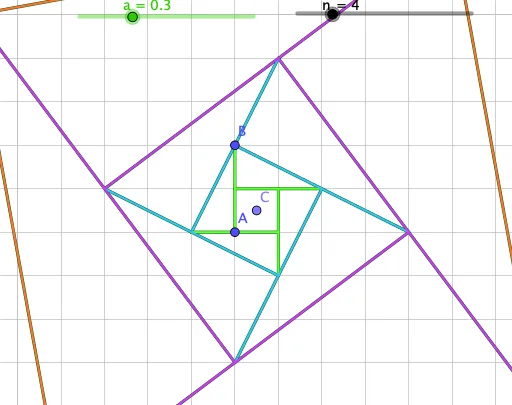
This example demonstrates an iterative “rotation-growth” construction in which squares and equilateral triangles are generated step by step. By repeatedly rotating selected segments and points, the diagram reveals persistent geometric structure and supports investigable claims (including inequalities comparing lengths or sizes across steps). The main mathematical ideas are transformation geometry—especially rotation (and related dilation/similarity behavior as implied by the construction), properties of squares and equilateral triangles, and using the evolving figure to reason about bounds or inequalities. In GeoGebra, the construction is built with commands such as Point to define key vertices, Rotate to create rotated images (producing new points like A′ and B′ and further iterates), Segment to form the sides/measurement links, and Sequence to generate a multi-step list of points (e.g., A1…A12, B1…B12) corresponding to each rotation step. Angle (and the underlying angle parameter α) provides the rotation amount, enabling the repeated process to be visualized dynamically. Suitable for secondary-school geometry exploration, transformation-geometry lessons, and contest preparation where students investigate pattern stability and length inequalities using dynamic constructions.
GeoGebra Commands & Parameters
Point(Line[A, Rotate[A, 90°, B]]) → CRotate(A, 90°, C) → A'Rotate(B, 90°, C) → B'Segment(A, B) → fSequence(Segment[Rotate[A, (i * 90°), C], Rotate[B, (i * 90°), C]], i, 0, 3) → l1Angle(B', C, A) → αSequence(Dilate[Rotate[l1, ((-i) * α), C], r^(i), C], i, 0, n - 1) → l2Element(l2, A1) → B1Element(l2, A2) → B2Element(l2, A3) → B3Element(l2, A4) → B4Element(l2, A5) → B5Element(l2, A6) → B6Element(l2, A7) → B7Element(l2, A8) → B8Element(l2, A9) → B9Element(l2, A10) → B10Element(l2, A11) → B11Element(l2, A12) → B12
AI Drawing Prompt Reference
Start with a square ABCD, then rotate it 90 degrees around point C to generate a new square A'B'C'D'. Continue to generate a series of new squares by rotating around point C, resulting in a sequence of 12 squares with gradually decreasing side lengths.
The prompt above was compiled from the original drawing commands and is for reference only.